
13-Aquamarine
September 15, 2022
Solved

MathCAD Prim Conversion - plots not plotting

  • September 15, 2022
  • 2 replies
  • 2343 views

I've converted a MathCAD file into MathCAD Prime (ver. 7).   For some reason the plot doesn't show.   The functions appear to be working.   Not sure what I'm doing wrong.  (see attached screen capture)


EDIT - attached Mathcad Prime document

Best answer by LucMeekes

Labelling problem. You've been trapped by Prime's (in)famous autolabelling feature.

Check the labels of your various variables (all) named f. If you want them to be the same, they must be labelled the same.

Once corrected you (should) get:
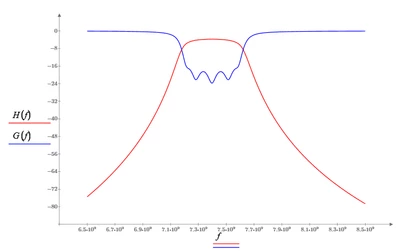
LucMeekes_0-1663272061629.png

Success!
Luc

2 replies

23-Emerald IV
September 15, 2022

Very nice picture, but... where is the Prime worksheet?


Success!
Luc

13-Aquamarine
September 15, 2022

I've attached the Mathcad Prime document

LucMeekes23-Emerald IVAnswer
23-Emerald IV
September 15, 2022

Labelling problem. You've been trapped by Prime's (in)famous autolabelling feature.

Check the labels of your various variables (all) named f. If you want them to be the same, they must be labelled the same.

Once corrected you (should) get:

LucMeekes_0-1663272061629.png

Success!
Luc

13-Aquamarine
September 15, 2022

Can auto-labeling be turned off?

Is this something that occurs when importing - or is auto-labeling always on?

What labels need fixing in my document?  I can't see the labels.  


13-Aquamarine
September 15, 2022

This is what I did to get the graph to display.  On the horizontal of the graph where the variable f is located I selected the variable - and then Math --> Label and chose "variable" from the drop down.