
12-Amethyst
February 3, 2026
Solved

Mathcad prime 10.0.0.0 failing to save

  • February 3, 2026
  • 4 replies
  • 614 views

Just as i thought the problem was solved it went back. I tried resetting my pc and downloading everything from scratch. I have a lenovo with windows 11 home. Everytime i try saving a document a corrupt saving page pops up. i will attach it here. Skærmbillede 2026-02-03 122031.png
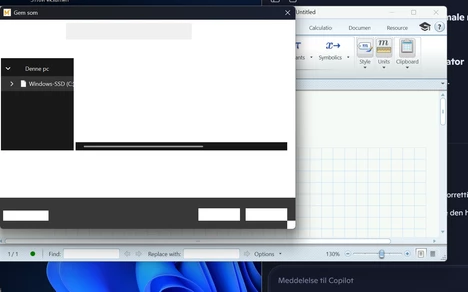
It happens when i use; save as, save or any type of export.

I have tried reinstalling several times, also as administrator, and it has the same outcome.

When running the program as admin it gives 3 more seconds on the save window but inevitably it crashes again. I made sure i unpacked the download zip-file locally and not using onedrive. Also i placed the app locally. 


Background info: Im a danish student at Aarhus university. They supply license to mathcad prime 10.0.0.0 and is therefore my only way of downloading the program. I have got a new pc as the old one got destroyed, and now the problem is occuring. I have tried following instructions to solution finding through AI, but it has not lead me to a working solution. I have reset my pc and tried reinstalling the program several times without a payoff. IT-support at uni leads me in the direction of mathcad or PTC as they dont know enough about the program.


William 

Best answer by William_G123

The problem has been resolved. It seemed to affect users who recently bought a new pc which was the reason Why the troubleshooting was easier for the IT-department. By communicating with the university IT-department We worked out that it was a compatibility issue with the latest update from windows and the software mathcad prime v. 10.0.0.0. The IT-department gathered license to mathcad prime v. 11.0.1.0 and this seems to have solved the problem. 

thanks for the help


William 

4 replies

23-Emerald IV
February 3, 2026

Hmmm, I see that your Prime 'speaks' English. I seem to see that your Windows is in Danish.

What if you run Prime in your locale?

To run Prime in your locale, start it with the proper switch. Try:

    MathcadPrime.exe /culture:dk-DK

(and hope that Danish is supported... EDIT: I see it isn't, you get English.).
The other option would be to install/switch your Windows to English....


Another item (less invasive than changing Windows language) you could try is about your keyboard: Do you use a Danish keyboard, then (install and) switch to English International.


Success!
Luc

12-Amethyst
February 3, 2026

hi Luc.


I tried changing the windows language to english. i still have the same thing happening unfortunately. I got a new pc today which needed to be set up. i did not download the latest software updates for windows in the settings before downloading mathcad. This actually made it possible to use mathcad and save files. but when i later downloadded and installed the latest updates from windows it crashed again when trying to save. I might suspect some compatibility issue with a windows update and the program. could this be the case?


William


Screenshot 2026-02-03 200343.png

23-Emerald IV
February 4, 2026

Hi William,

That certainly could be the case. It wouldn't be the first application (not even the first Prime) that suffers from a windows update or hotfix. The strange thing though is that only you seem to be affected by it. That could be when your PC has certain hardware that requires a specific update.
I've checked that my Prime 10 (express) on Windows 11 runs and saves fine.  I've updated my Windows 11 to the latest update, the 2026-01 Preview Update (KB5074105( (26200.7705) just now, and the result afterwards is the same: runs and saves fine.

I guess you should contact PTC support and have them help you. (Note that this forum is for and by users)


Success!
Luc

1-Visitor
February 4, 2026

Hey
I have the same problem. Have you found a solution?

I am also a student at Aarhus Univerity.


- Andrea 

12-Amethyst
February 4, 2026

Hej Andrea 


jeg har ikke fundet en løsning endnu, men du er velkommen til at skrive til mig over mail. 

Så skal jeg nok opdatere dig, hvis jeg finder ud af noget.


-William

Catalina
Community Moderator
February 13, 2026

Hi @WG_14482986

I wanted to see if you got the help you needed.

If so, please mark the appropriate reply as the Accepted Solution or please feel free to detail in a reply what has helped you and mark it as the Accepted Solution. It will help other members who may have the same question.

Of course, if you have more to share on your issue, please pursue the conversation.

Thanks,

Catalina | PTC Community Moderator
1-Visitor
February 6, 2026

HI William and PTC, I have the same problem, and I am also from Aarhus University, and I also have a new Lenovo. I think since we are 3 people it might be something to do with the AU download version and a new windows update maybe. Have you asked AU IT support? 

BR Jonathan.

25-Diamond I
February 6, 2026

If you have access to one of those download pages 

PTC Software-Download - MathcadPrime

Mathcad Downloads

you could try to download the software directly from PTC. You should save your current license file and point the installer to it when you install the software. I assume that the license for 10.0.0.0 will also be valid for 10.0.1.0 but sure not for the current version 11.

I guess that downloading the student version via the second link should work if you provide the product number you should have received initially.

Otherwise to be eligible to access the software, you have to somehow link your license (or was it the product number?) to your user account. Unfortunately, I don't know the details and only remember that it was quite confusing at the time. But maybe it's easier and clearer now...

William_G12312-AmethystAuthorAnswer
12-Amethyst
February 13, 2026

The problem has been resolved. It seemed to affect users who recently bought a new pc which was the reason Why the troubleshooting was easier for the IT-department. By communicating with the university IT-department We worked out that it was a compatibility issue with the latest update from windows and the software mathcad prime v. 10.0.0.0. The IT-department gathered license to mathcad prime v. 11.0.1.0 and this seems to have solved the problem. 

thanks for the help


William