5-Regular Member
March 14, 2025
Solved

Mathcad prime 10. Advanced Controls. List. Writing a script on JS

  • March 14, 2025
  • 2 replies
  • 949 views

I have an array (numbers of rows - 1,  number of columns - can be different). Example: I enter a variable in mathcad d = [1 5 10 15] and i want this array to be displayed in my list as d = 1   d= 5 etc... Help please. Preferably in JS. Translated using Google Translate.

Best answer by Werner_E

> i want this array to be displayed in my list as d = 1


Which list? And where? An external text file?

Please specify more precisely and if possible give one or two examples to show what you are looking for.


Ahh, you shouldn't hide important informations just in the thread subject!

In case you are looking for a vector to be the input for the items of a list box, you will find some examples here in the forum - some more , some less sophisticated.


A simple one is attached - hope it helps
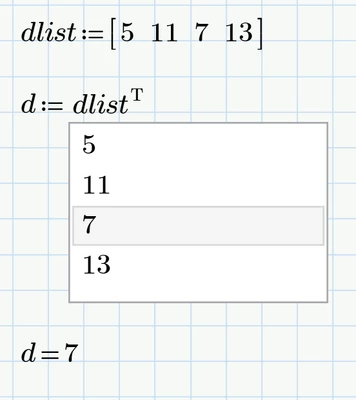
Werner_E_0-1741928104322.png


// TODO: Add your initialization code here
// Initialize Selection If desired
ListBox.CurSel(0);

function ListBoxEvent_Start(Inputs, Outputs) {
 // TODO: Add your code here
};

function ListBoxEvent_Exec(Inputs, Outputs) {
	var options = Inputs[0].Value;

	ListBox.ResetContent()
	for(var i=0; i < options.length; i++) {
	ListBox.AddString(options[i]);
	}

	Outputs[0].Value = options[ListBox.CurSel()];
};

function ListBox_SelChanged(Inputs, Outputs) {
 // TODO: Add your code here
};

function ListBox_DblClick(Inputs, Outputs) {
 // TODO: Add your code here
};



2 replies

18-Opal
March 14, 2025

Like this?  

ppal_1-1741925420206.png


Werner_E25-Diamond IAnswer
25-Diamond I
March 14, 2025

> i want this array to be displayed in my list as d = 1


Which list? And where? An external text file?

Please specify more precisely and if possible give one or two examples to show what you are looking for.


Ahh, you shouldn't hide important informations just in the thread subject!

In case you are looking for a vector to be the input for the items of a list box, you will find some examples here in the forum - some more , some less sophisticated.


A simple one is attached - hope it helps

Werner_E_0-1741928104322.png


// TODO: Add your initialization code here
// Initialize Selection If desired
ListBox.CurSel(0);

function ListBoxEvent_Start(Inputs, Outputs) {
 // TODO: Add your code here
};

function ListBoxEvent_Exec(Inputs, Outputs) {
	var options = Inputs[0].Value;

	ListBox.ResetContent()
	for(var i=0; i < options.length; i++) {
	ListBox.AddString(options[i]);
	}

	Outputs[0].Value = options[ListBox.CurSel()];
};

function ListBox_SelChanged(Inputs, Outputs) {
 // TODO: Add your code here
};

function ListBox_DblClick(Inputs, Outputs) {
 // TODO: Add your code here
};


5-Regular Member
March 14, 2025

This is exactly what i wanted, thank you

25-Diamond I
March 14, 2025

@panzerbaha wrote:

This is exactly what i wanted, thank you


Glad you got what you needed.

So you may consider closing the thread unless there are additional related questions.