
5-Regular Member
January 4, 2025
Solved

Mathcad Prime 10: Excel File Generated by WRITEEXCEL has wrong time stamp

  • January 4, 2025
  • 2 replies
  • 2320 views

Hello all,

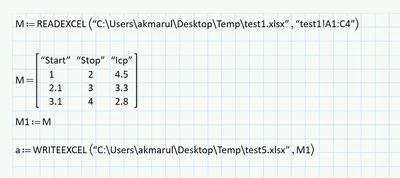
I found out the WRITEEXCEL generate excel file with wrong time stamp. This is my worksheet.

test1.xlsx is a simple file, that contain 4x3 information.
AkmarulSalleh_0-1735977820463.png


Timestamp generated is 28 March 2009. Anyone facing the same issue?

AkmarulSalleh_1-1735977914663.png


Regards


Best answer by LucMeekes

Ah, apparently they've dropped that possibility somewhere between Prime 4 (where it is possible) and Prime 9 (get the same error message as you).


Success!
Luc

2 replies

23-Emerald IV
January 4, 2025

Depends on what timestamp you're looking at. Is it the creation date, or the latest access date?


Success!

Luc

5-Regular Member
January 4, 2025

Hello. It is the creation time. I just created test5.xlsx today, but the date for the file is 28 March 2009.

5-Regular Member
January 4, 2025

You can try this simple 1 line code, and verify if the date is correct. I still got 28 March 2009.. hmm... weird.. 

AkmarulSalleh_0-1735982912966.png


25-Diamond I
January 4, 2025

I can't duplicate the issue.

When I create an Excel file via WRITEEXCEl, it gets the correct system date.

You are sure that OS date/time are set correct on your system?

5-Regular Member
January 5, 2025

AkmarulSalleh_0-1736070728528.png

System Date is all correct. I never have this kind of issue, with other software. I'll ask Mathcad Technical support


25-Diamond I
January 5, 2025