
3-Newcomer
August 17, 2025
Solved

Mathcad Prime 10 - Template default view to document draft

  • August 17, 2025
  • 1 reply
  • 784 views

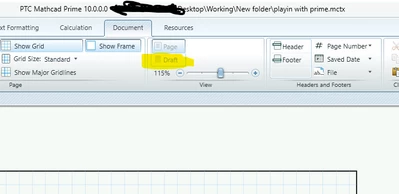
When making a template in Mathcad Prime 10.0.0.0, i set the document -> View -> to "Draft".  I then save and reopen the template but it always reverts to "Page" view.  I never had this problem with Mathcad15.

-Is there not an ability to set the user made template (document -> View) to always open in "Draft" on that specific template?

-Additionally, i have the same question for setting the default zoom on the Document -> View.  Can the zoom setting be set in the user made prime template.


Note: if i've got 10 people using the template, i doubt many of them will remember to manually change document to "Draft" view each time they open the template. 
 

BC_14003925_0-1755455113015.png


Best answer by Werner_E

I don't think that Prime provides the settings you are looking for.

Sheets are always opened in 'Page View' mode and with the zoom factor which was chosen the last time in Prime - its not a worksheet option.

1 reply

Werner_E25-Diamond IAnswer
25-Diamond I
August 17, 2025

I don't think that Prime provides the settings you are looking for.

Sheets are always opened in 'Page View' mode and with the zoom factor which was chosen the last time in Prime - its not a worksheet option.

3-Newcomer
August 26, 2025

Thanks for the response and confirmation of another feature that Mathcad Prime 10 doesn't offer.

DJNewman
18-Opal
August 26, 2025

You should...

1. Upgrade your PTC.com account to reflect you're a customer (if you don't know how, ask one of the admins [don't ask me, I also don't know how])

2. Submit this as an idea on the Mathcad Ideas board: https://community.ptc.com/t5/Mathcad-Ideas/idb-p/PTCMathcadIdeas

PTC Marketer Creo and Mathcad. I run their YouTube channels, some Creo campaigns, and all Mathcad campaigns and communications.