

10-Marble
October 28, 2021
Solved

Mathcad Prime 7.0.0.0 Crash when editing text box/block with multiple colors/bolded font

  • October 28, 2021
  • 2 replies
  • 8287 views

I believe the title says it.

At first I though it might be related to having a Plot nearby or the text box overlapping.

Then I thought it was related to multiple colors of text.

I haven't quite narrowed it down, just wanted to bring it up for developers...(lol--do they read this?)

I am using Express.  Maybe my file is just getting too big (although it is still smaller than 1 MB).
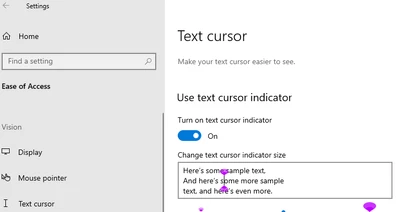
Best answer by MSheykman

Do you by chance have "Text cursor indicator" set to "On"? 

MSheykman_0-1655030103845.png

If yes - disable it.

2 replies

24-Ruby III
October 28, 2021

Could you please provide Mathcad Prime worksheet as an example?

1-Visitor
February 3, 2022

I think, if you really want to replicate the MathCad crash, follow next lines:

  • add text field with "CTRL+SHIFT+T".
  • Write some text and change something. For example make the first letter bold "CTRL+B"
  • than if move with cursor with right arrow on keybard

-> boom all your work up to last save will be lost. It is really nightmare. Please fix this quickly. 

5-Regular Member
June 7, 2022

I was not able to reproduce the problem in Mathcad Prime 8 and 7 using these steps. 

There might be some additional circumstances that we are missing.

If you continue having this problem please turn to tech support.

4-Participant
June 3, 2022

I have noted this same problem all too many times and shifted back to Mathcad 15 because of it.  However, I'd like to move forward with Prime.  I thought it would be fixed with Prime 8.0, but no luck - just lost a bunch of edits because of it.  Hard to believe this has not been fixed yet.

****************************************************************************************

PTC QA team - this is a REAL problem likely to lose customers

****************************************************************************************

I've tried a few methods of exiting a text box after changing formatting, and the only one that seems to work is clicking outside the text box area without touching the arrow keys.  Not sure how repeatable this method will be, but I definitely can reproduce the crash by formatting, then exiting the box with arrow keys.  Has anyone heard of a fix or other resolution?   After the many times I've installed the "latest edition" of Prime, it is STILL not reliable. I guess I'm going back to Mathcad 15 again . . .

23-Emerald IV
June 10, 2022

No problem in Prime 7 or 8 for me.


I suspect that a Windows regional setting may be involved (knowing that certain keystrokes don't work for users with an Italian keyboard).

I'm on UK english language and using the US-International keyboard setting.


Success!
Luc