
3-Newcomer
July 25, 2023
Question

Mathcad prime 7, how to simply copy text and math into word

  • July 25, 2023
  • 2 replies
  • 2964 views

Hello, 


I am using Mathcad Prime 7, paid version and i want to copy and paste text and math into Word. 

I have tried simply selecting the items and copying them, however they don't look good, some text falls off as the text boxes seem to shrink both lengthwise and heightwise as shown here in the screenshot. As i have loads of pages to import, i don't want to check and enlarge each textbox individually. 

I would like to know how to fix this without having to result to making screenshots, exporting to PDF etc etc.. 


Thank you!
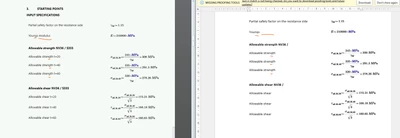
EvanDeV_0-1690272745176.png


2 replies

21-Topaz II
July 25, 2023

Hi can you upload your mathcad worksheet as Prime 9 seems to work OK>

EvanDeV3-NewcomerAuthor
3-Newcomer
August 1, 2023

Hello, 

Here i have uploaded the sheet

16-Pearl
July 26, 2023

Try opening your text boxes (in Mathcad) up to the right so that there is white space.  It looks like the font is getting converted to something that doesn't fit in the box when it is pasted.  Just a guess.


If the bottom edge of the text (dangling character stems) is still getting clipped, try a different text font.


Jeff

EvanDeV3-NewcomerAuthor
3-Newcomer
August 1, 2023

Hi, 

The problem is that I would like to keep my font the same. 

I have "fixed" the problem by making my font smaller, but now of course its a bit harder to read. 

A different font is not really possible as i have to stick to a certain format. 

21-Topaz II
August 1, 2023

Hi,

Are you sitting down? About to enter the world of MS Word macros.  Here is a little macro that sets all the frames in a document surrounding the text to autosize so they show all text.   It is not perfect as adequate multiline text will revert to single line text and you manually need to handle these.


Sub FormatTextsInFrames()
Dim f As Frame
Dim objDoc As Document
Set objDoc = ActiveDocument
For Each f In objDoc.Frames
f.HeightRule = wdFrameAuto
f.WidthRule = wdFrameAuto
Next f

End Sub


Before running macro

Capture.JPG

After running macro

Capture2.JPG

Cheers

Terry