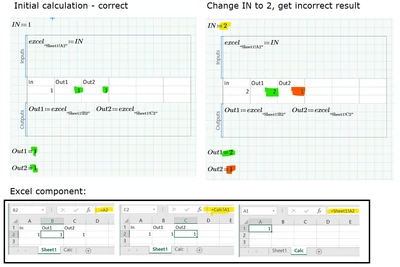
Mathcad Prime 8.0 - Excel component does not update when input changes
Hi there
I am using Mathcad Prime 8.0 and Excel 365 32-bit.
I have a Mathcad Prime 8.0 sheet (converted from Mathcad 15.0) that sends input e.g. NPS:=2.5 into an Excel component and extracts dependent output data. It appears that if I change the Mathcad parameter to e.g. NPS:=8, Mathcad updates the input inside Excel, but Excel does not auto-calculate. Excel apparently only auto-calculates if I force re-calculation through CTRL+F5 from Mathcad, or if I open the Excel component and force re-calculation (e.g. Calculate Now)
I have Auto Calculation and multi-threading enabled in Mathcad, and Calculation Options set to Automatic in the Excel component.
Has anyone seen this before and know how to enforce auto-calculation without using CTRL+F5? E.g. write a macro inside the Excel component that triggers auto-calculation? However, it looks like a bug.
Thanks.