
1-Visitor
September 28, 2024
Question

Mathcad Prime List Box

  • September 28, 2024
  • 1 reply
  • 1090 views

Hi,

I have encountered a problem. Normally, I know how to prepare a list box, but in this instance, I need to create a dynamic list box such that input from another list box influences it.


Specifically, I need to create a list box asking for the “Bolt Type,” but for that, I need two inputs, similar to a real case scenario: Bolt types depend on “Standard” and “Unit System.” Please find the attached image that I saw in a PDF.


Please help me to create this in Mathcad Prime. Thanks in advance.


The image:
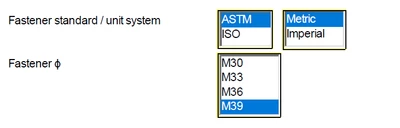
GG_11924958_0-1727502067686.png


1 reply

25-Diamond I
September 28, 2024

You can provide multiple inputs in two different ways:

1) use a vector for input. The elements of it are


Inputs[0].Value[0]
Inputs[0].Value[1]
etc.


2) use multiple individual Inputs. How to achieve that is not implemented intuitive as the right click options won't provide a "Add another input". You have to use the "Insert Right" option from the "Matrices/Tables" menu or the keyboard short "Shift - Space". In the script the inputs can be used as


Inputs[0].Value
Inputs[1].Value
etc.


BTW, it looks like the picture you show does not stem from a Prime sheet but rather from a real Mathcad worksheet.
If you have access to the worksheet itself and not only to a pdf print, you may try to let Prime convert it to the new format. At least it may be wort a try though I have my doubts if the converter wold be capable enough.


21-Topaz II
September 28, 2024

Hi,

You can use this sheet as an example of cascading list boxes.

4-Participant
December 30, 2025

I downloaded this sheet to watch the associated webinar and noticed that the list box doesn't work in Prime 11.0. Have you noticed that and do you have any ideas on what the difference between 10 and 11 is?