10-Marble
Oct 30, 2025 2:57 PM UTC
Solved

MathCAD Problem Solver? 2 equations, 2 unknowns

I'm using MathCAD 9.0.0.0. I have 2 equations with 2 unknowns. I need solve for "DF" and "DG." I've attached 2 files. The file I need help with is "MET211_ProjectP2_Sections.mcdx." The other file "MET211_ProjectP2_Joints.mcdx" I attached as reference because I already solved for these variable using another method. Those of you familiar with Statics know there is the method of joints and the method of sections. Not that you need to know Statics or need the reference file to show me how problem solver works, I just added it incase it helps you understand my situation better. The way this was demonstrated was the demonstrator had a fancy calculator with a "problem solver" feature that allowed him to plug in 2 equations to solve for 2 unknowns. I don't have a fancy calculator. All I have is MathCAD, so I hope this can do it.


Thank you,

     Brent

LucMeekesAnswer
23-Emerald V
Oct 30, 2025 6:29 PM UTC

Something like:

LucMeekes_0-1761848869898.png

which means:

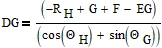
LucMeekes_1-1761848932307.png

and

LucMeekes_2-1761848940955.png

Success!
Luc


5 replies

LucMeekes23-Emerald VAnswer
23-Emerald V
Oct 30, 2025 6:29 PM UTC

Something like:

LucMeekes_0-1761848869898.png

which means:

LucMeekes_1-1761848932307.png

and

LucMeekes_2-1761848940955.png

Success!
Luc


Translate
10-Marble
Oct 31, 2025 11:23 AM UTC

My math equation was off, so I had to adjust it to get the correct answer. Those are some big ugly equation result, but it works. Thank you!


Brent

Translate
Werner_E
25-Diamond I
Oct 30, 2025 10:39 PM UTC

You can use a solve block with "find". You have to provide guess values for variables you are looking for:

Werner_E_0-1761863311266.png

If it helps in documenting the calculations you may define functions for the sum of forces dependent on DF and DG and use these functions in the solve block.

Werner_E_1-1761863388163.png

BTW, in this case its not necessary to add the unit kip to the zero value, but in other cases Prime insists on a correct unit even if the value is zero. So it may be good habit to add the correct unit to all zero values by default.


I won't recommend using the symbolic "solve" if you are just looking for numeric values.

However, it can be advantageous to use the symbolic solver if you want to see a general symbolic formula in the input values and then perhaps evaluate it for different input values for comparison.
This is exactly what Luc did. He determined the symbolic solution before any variables were defined numerically.
You can also achieve this by clearing the variables for use in the symbolic engine:

Werner_E_2-1761863929188.png


Prime 9 sheet attached


Translate
10-Marble
Oct 31, 2025 11:38 AM UTC

Thank you for this thorough explanation!!! You're first solution seems like the way to go for fast and clean results. The 2nd solution and LucMeekes solution is a way to show the work, but you have these big ugly formulas. I was already working LucMeekes solution before I read your post, so I hit the accepted solution on that post. Although I wish there was a way to select both of your posts as the solution because you provided me with 2 excellent solutions that will be of value for different applications. Thank you so much!


Brent

Translate
19-Tanzanite
Oct 31, 2025 12:52 PM UTC

As your two simultaneous equations are linear in the unknowns you could also solve as follows::


Linearsolve.png


Translate