
18-Opal
November 20, 2016
Solved

Mathcad vs Prime rounding

In mathcad 15:

The answer is as expected. In Prime there are rounding issues. How do I eliminate this rounding?
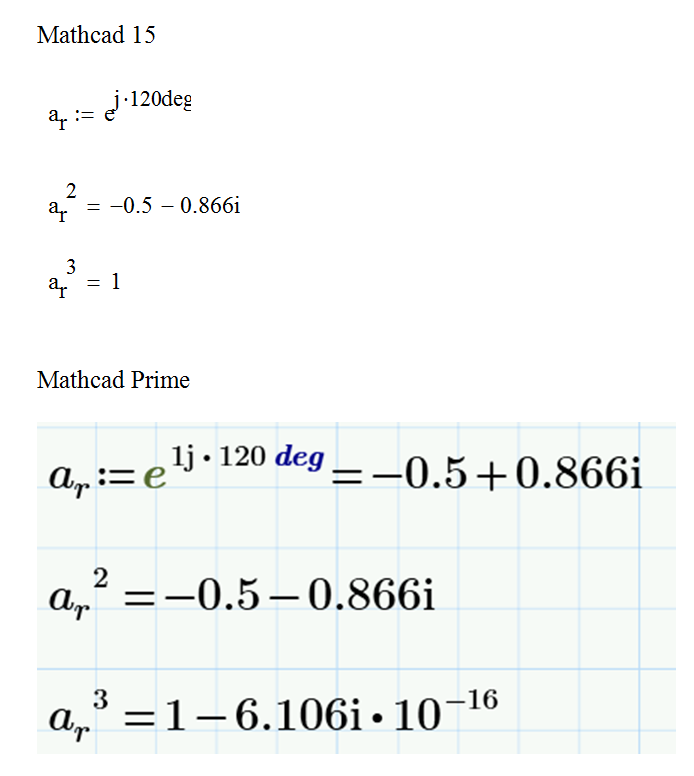
PRIME VS MATHCAD.png

MJGAnswer
1-Visitor
November 22, 2016

Change the result formatting to decimal.

Formatting -> Results -> change "General" to "Decimal"

12 replies

23-Emerald I
November 21, 2016

I believe this is an artifact of "zero tolerance" setting; there is always calculation error, and a setting below which small numbers are not displayed.  10^-16 is pretty small!

Translate
18-Opal
November 22, 2016

Pretty small is not good enough. Zero is what we are after. Pretty small leaves a lot of clutter on the work sheet.

Translate
23-Emerald V
November 21, 2016

This occurs due to differences in 'zero threshold' settings between Prime and Mathcad, like Fred indicated.

In Mathcad (no Prime) you can set the 'zero threshold' value to an exponent (of 10) and values that are within that distance from zero are displayed as 0. The range for 'zero threshold' is 0 to 307 and the default is 15, so values between + and - 10^-15 are displayed as 0.

In Prime (express) I can find no control to set a zero threshold, This means that any value different from 0 that can be reprepresented withing the floating point range is shown as is:

Success!
Luc

Translate
18-Opal
November 22, 2016

Roundpng.png

How do you display this complex part as zero? A^3 is = 1

Translate
23-Emerald V
November 22, 2016

Set the complex threshold. But that too is only available in Mathcad, not in Prime.

Luc

Translate
