

1-Visitor
September 6, 2016
Solved

Mathcad15: Is it possible to embed a object as an 'icon' in Mathcad file?

  • September 6, 2016
  • 4 replies
  • 5412 views

In Mathcad15, is it possible to embed an object as an 'icon' in Mathcad file? I have many pictures and Excel files which contain the derivation/explanation for the equations I have written in Mathcad15. I basically want an icon linking to each picture which, when clicked, opens up the picture. I don't want to paste the picture in the Mathcad space.

I tried Insert-->Object but using this opens a window for the Excel file. I want a icon which could be clicked and file could be opened.
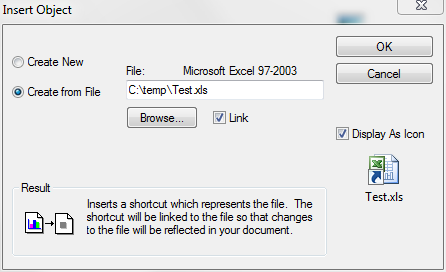
Best answer by MJG

What about Insert->Object:

4 replies

19-Tanzanite
September 6, 2016

You cant insert an icon like that, no. But you can insert a hyperlink to a file. Type some text, select it, right click, choose "Hyperlink".

12-Amethyst
September 6, 2016

Hi. Check the attached, please.

Best regards.

Alvaro.

19-Tanzanite
September 7, 2016

Unfortunately, that does not create a link to a file outside of Mathcad. It embeds the spreadsheet in the Mathcad document. In Mathcad there is no way to paste as an OLE link. This has come up before, but I can't find the relevant threads. Your suggestion is a good starting point though, because one "trick" that was suggested in those earlier threads was to embed a spreadsheet that linked to another spreadsheet (i.e. the cells are populated entirely from another linked spreadsheet).

19-Tanzanite
September 7, 2016

With more searching I found several threads about this, but they are all old enough that PTC deleted the example files . Here's what I wrote almost 14 years ago () in one thread:

"To go from Excel to Mathcad, you can use an Excel component, but an extra step is needed. In Mathcad an Excel component is embedded, not linked, so it is not possible to do it directly. Let's say your Excel sheet is called DATA.XLS. First create a new Excel file, let's say LINK.XLS (The filename is not important though, you will be able to delete this file after the link has been created). Copy the data in DATA.XLS, and select the first cell in LINK.XLS. Go to "paste special", and click on the button that says "paste link". Now save LINK.XLS. In the Mathcad worksheet, insert an Excel component, and select "create from file". Create the embedded component from the file LINK.XLS, after which you can delete LINK.XLS (since it is embedded). The output of the component is now linked to DATA.XLS."

Adjust for the latest Excel version

MJG1-VisitorAnswer
1-Visitor
September 7, 2016

What about Insert->Object:

1-Visitor
September 7, 2016
I tried Insert-->Object but using this opens a window for the Excel file. I want a icon which could be clicked and file could be opened.

Please clarify the difference between what you observed:

opens a window for the Excel file

and what you want:

file could be opened