
15-Moonstone
January 15, 2026
Solved

Matrices

  • January 15, 2026
  • 2 replies
  • 589 views

Hello!


Is it possible to do the following:

I have two matrices, say 5x1, but want to perform computation using 4 elements of both matrices. In other words I want to omit one row (value) form the computation. The result will be vectorized. 


Best regards,

Sergey
Best answer by Werner_E

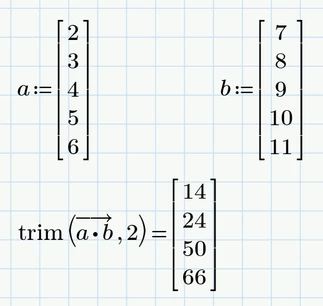
So I think that trimming the final result seems to be the best way to do. But not using my 'deleteRow' but rather the built-in 'trim' 🙂

Werner_E_0-1768550522292.png


2 replies

12-Amethyst
January 15, 2026

--------------------------------

Screenshot_1.png

Sergey15-MoonstoneAuthor
15-Moonstone
January 15, 2026

Спасибо за методику. Протестирую


Сергей

25-Diamond I
January 15, 2026

For the special case of two vectors you could use something like this

Werner_E_0-1768501971810.png

This works as long as the original vectors do not contain any NaN's.


A more generic approach is the use of submatrix. But I would rather apply it to the result and not to the input vectors.

Problem with submatrix is that it needs some special treatment if you want to omit the very first or the very last row.

So it would be beneficial to use a utility function which deletes any row from an arbitrary matrix.

Werner_E_1-1768502206044.png


Unfortunately you don't explain why you would want to omit a specific row. 

If you want to omit a specific row because this would throw an error like in

Werner_E_2-1768502379087.png

the aforementioned  methods will not work and it would be necessary to omit the offending row before applying the operation.

Using the utility function shown above this could be done that way:

Werner_E_3-1768502592953.png


25-Diamond I
January 15, 2026

Looks like I tried to re-invent the wheel 😞


There is no need for a custom made utility function "deleteRow(M,r)' because the built in function "trim(M,r)" does the very same job and you could also use it to omit more than just one row:

Werner_E_0-1768511247153.png


Sergey15-MoonstoneAuthor
15-Moonstone
January 16, 2026

"Unfortunately you don't explain why you would want to omit a specific row" - I will try to explain.


I have a parameter in my calculations. Say, q=100mm. This parameter is a part of an equation. But I want to perform the computation of the several cases simultaneously when q=100mm, 200mm, 300mm and so on. That is why I use 5x1 matrix. But in one case, I want to ommit the value of q=200mm because this is meaningsless in my case. This is the prime reason of me asking about the omiting technique in Mathcad using matrix operators.