

1-Visitor
October 20, 2014
Solved

Matrix Display from a Program with Row or Column >9

  • October 20, 2014
  • 3 replies
  • 1268 views

Hi,

I produced a program where there are 10 columns and the resultant matrix displays as a table rather than in the normal matrix format. When reducing the number of columns to 8 or less the normal matrix format is displayed. Is there a fix for this?

Sharon
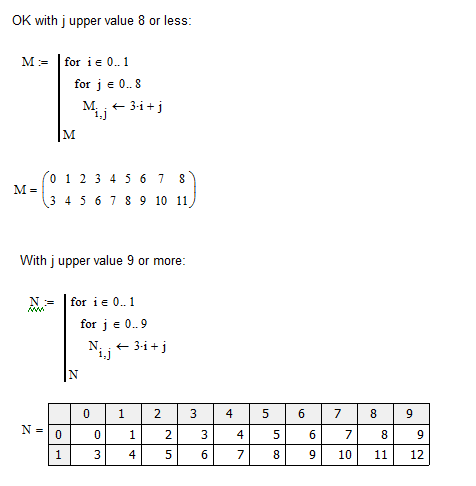
Matrix Problem 01.png

Best answer by StuartBruff

Yes. Double click on the matrix display. This will bring up the "Result Format" dialog box. Choose the "Display Options" tab and then click on the "Matrix display style" dropdown control. Choose "Matrix" and then hit OK.

You can make this the default for your worksheet by clicking in a blank area of your worksheet and then getting at the dialog box via the Format menu (Format\Result).

3 replies

23-Emerald V
October 20, 2014

Yes. Double click on the matrix display. This will bring up the "Result Format" dialog box. Choose the "Display Options" tab and then click on the "Matrix display style" dropdown control. Choose "Matrix" and then hit OK.

You can make this the default for your worksheet by clicking in a blank area of your worksheet and then getting at the dialog box via the Format menu (Format\Result).

1-Visitor
October 20, 2014

Thanks Stuart for your prompt and helpful answer. Just great.

Sharon.

23-Emerald V
October 20, 2014

No worries, Sharon.

Stuart