
1-Visitor
April 5, 2020
Solved

MATRIX UNITS WITH EXCEL COMPONENTS

  • April 5, 2020
  • 1 reply
  • 3379 views

Hi everyone, i would really appreciate if u could help me with this problem i have:

I'm trying to write the units in the output for an excel component, the thing is that when I do that, it doesn't show when i write the variable. I don't know if I'm doing anything wrong. I watched a video where someone did the same and the units where there. I'm not able to do it anyway.
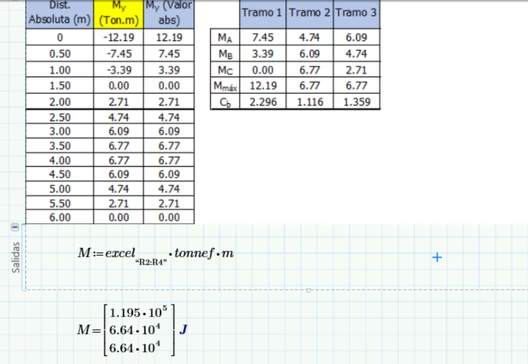
 

image.png

Best answer by LucMeekes

Your picture shows that your variable M does have a unit, namely 'J' for Joule.

What is there that doesn't work?

Did you expect that M would be presented with the unit 'tonnef * m' ?

You'll have to add those yourself. Mathcad standard presents values in SI units.


Success!
Luc


1 reply

LucMeekes23-Emerald IVAnswer
23-Emerald IV
April 5, 2020

Your picture shows that your variable M does have a unit, namely 'J' for Joule.

What is there that doesn't work?

Did you expect that M would be presented with the unit 'tonnef * m' ?

You'll have to add those yourself. Mathcad standard presents values in SI units.


Success!
Luc


Gabriel131-VisitorAuthor
1-Visitor
April 5, 2020

I shoul've specified that i didn't write the unit "J", and I do not know why it's there. What I'm trying to do is to give those numbers (which come from cells in the excel sheet) a unit. Just how is shown in the video: https://www.youtube.com/watch?v=fazZImIEKNk.


thanks

21-Topaz II
April 6, 2020

Hi,

If you watch the video closely in the output section an excel range is specified and this is the column of data without unit header.  Again in the video and in the excel output section the vector of selected excel cells is multiplied by the required units.

Cheers

Terry