
21-Topaz II
February 19, 2020
Question

Missing animation

  • February 19, 2020
  • 5 replies
  • 3413 views

Hello everyone
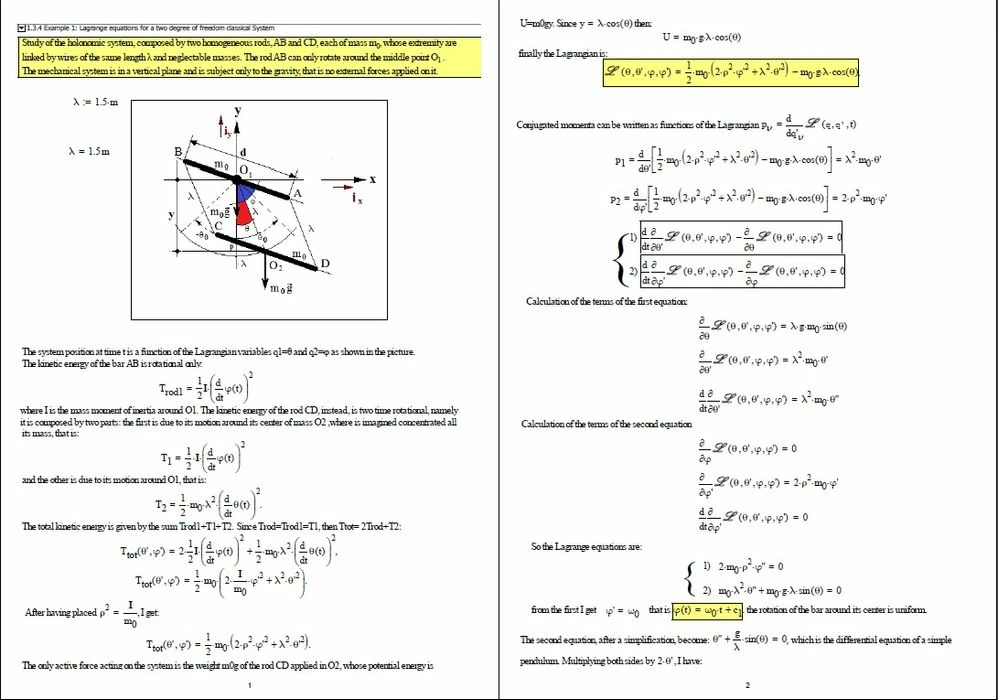
an unusual and old mechanical problem. Unfortunately there is no animation.The parameters - however - are not the right ones to obtain oscillations.  After a lot of work - I can't even do the animation. I would be very happy if someone completed the job. Thank you very much.
two rotating rods 0.jpg


5 replies

23-Emerald IV
February 19, 2020

Here's an animation:

LM_20200219_Animation.gif

Luc

-MFra-21-Topaz IIAuthor
21-Topaz II
February 19, 2020

Hi -

very interesting!

Sorry! I wasn't qute clear in my question.

Unfortunately I wish the pendulum animation!!!

24-Ruby IV
February 19, 2020
23-Emerald I
February 19, 2020

I don't see any attempt at animation.  


Animation uses the built-in variable FRAME.  You set FRAME in the worksheet so the calculation works, then the animation setup specifies the start and finish values for the animation.  Whatever function you want to plot must use FRAME as its parameter.  In your case you'd want t(FRAME) = , I believe.  Then you select the area of the sheet you want in the animation and hope that Mathcad does its thing.  (I suggest you try this out in a separate worksheet before you start polluting your document.


-MFra-21-Topaz IIAuthor
21-Topaz II
February 19, 2020

Hi -

 Thank you. I have been creating animations for decades. Since I was tired of working on it, I would have liked someone to make it for me.

24-Ruby IV
February 19, 2020
-MFra-21-Topaz IIAuthor
21-Topaz II
March 1, 2020

Hi All,

I was referring to the following animation (which was somewhat laborious):

Adding the video was impossible, so you find it attached as any file.


-MFra-21-Topaz IIAuthor
21-Topaz II
March 4, 2020

Hi,

I would like to note that in the system sketch, the Cartesian axes must be rotated 180 ° for correspondence with the equations. The animation I wanted is this (with some imperfections):

see attached