
1-Visitor
September 25, 2015
Solved

Modifying Matrix Elements From Within Scripted Object

  • September 25, 2015
  • 1 reply
  • 3177 views

I am trying to make changes to matrices with a VBScript Scripted Object. I can get the matrix with worksheet.getValue("Matrix"), but changes I make to that with Matrix.SetElement do not persist outside the script. It seems like the matrix returned by worksheet.getValue is a new object rather than a reference to the one in the worksheet, is that correct? If so is there any way to modify the original matrix from within the VBScript?

Thanks,

Evan
Best answer by StuartBruff

Evan Painter wrote:

I am trying to make changes to matrices with a VBScript Scripted Object. I can get the matrix with worksheet.getValue("Matrix"), but changes I make to that with Matrix.SetElement do not persist outside the script. It seems like the matrix returned by worksheet.getValue is a new object rather than a reference to the one in the worksheet, is that correct? If so is there any way to modify the original matrix from within the VBScript?

Thanks,

Evan

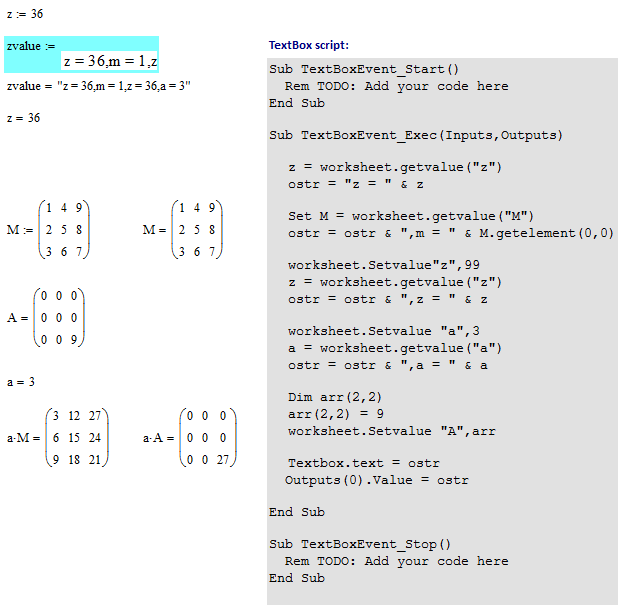
Yes, but not if the variable (scalar, string or matrix) is _defined_ within the worksheet, otherwise the Mathcad setting overrides the scripted change.

Stuart

1 reply

23-Emerald V
September 26, 2015

Evan Painter wrote:

I am trying to make changes to matrices with a VBScript Scripted Object. I can get the matrix with worksheet.getValue("Matrix"), but changes I make to that with Matrix.SetElement do not persist outside the script. It seems like the matrix returned by worksheet.getValue is a new object rather than a reference to the one in the worksheet, is that correct? If so is there any way to modify the original matrix from within the VBScript?

Thanks,

Evan

Yes, but not if the variable (scalar, string or matrix) is _defined_ within the worksheet, otherwise the Mathcad setting overrides the scripted change.

Stuart

epainter1-VisitorAuthor
1-Visitor
September 28, 2015

Okay, Thanks. So that basically means I can only manipulate matrices that are defined via a scripted object originally? I think I can work with that. Thanks.

19-Tanzanite
September 29, 2015

No, you misunderstand how SetValue works. SetValue binds the variable prior to any definition in the worksheet, regardless of the location of the scripted component. That means any worksheet definition simply overwrites it. So you can't read matrix M, modify an element, and write matrix M back to the worksheet. The definition of M in the worksheet overwrites the changes. You could write back a matrix M2, and as long as there's no definition of M2 in the worksheet it can be evaluated and used in calculations. You can get some quite weird behavior doing things like this though. Why do you want to modify it from within a scripted component?