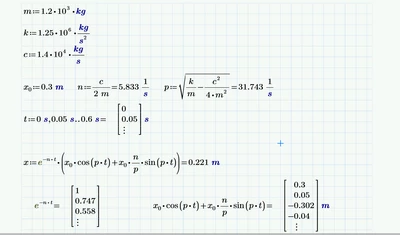
First let me say that whenever possible you should always attach the worksheet itself.
You defined a range t and in the same region you numerically evaluated it (the = sign after the definition). This is an undocumented trick to turn a range into a vector.
So t is a vector.
x is defined as a product of two factors and as you show yourself in the last line, both factors are vectors. And the "normal" product of two vectors is ... one single scalar (dot product, scalar product).
To get the result you expect, you must vectorize (the arrow operator over an expression) the right hand side of the definition of x.
Keep in mind that e^t actually should throw an error because there is no definition in math to take a number to the power of a vector. Prime instead applies automatic implicit vectorization in that case (also applies to sin(t), etc) and evaluates that expression for each vector el/ement in a row and collects the various results in its result vector - excactly what you had in mind. Multiplication on the other hand is an operation defined for vectors and if you want it to be executed elementwise again, you must manually vectorize the operation.#