24-Ruby IV
July 8, 2020
Solved

My Math(cad) error?

  • July 8, 2020
  • 1 reply
  • 2957 views

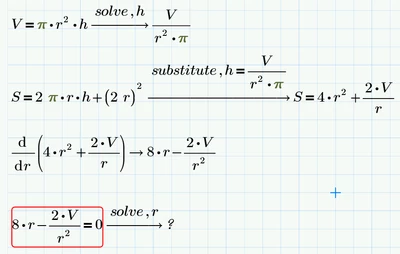
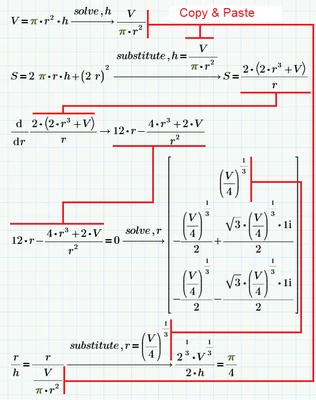
One professor of mathematics read my article in the attachment and said that figure 2 contains a gross mathematical error and because of which this professor does not want to talk to me. He does not want to tell me about this error, and I (not a mathematician) cannot in any way find it. Help me, otherwise I’ve been sleeping badly for two nights...

Prime 5 - OKPrime 5 - OKPrime 6Prime 6


Best answer by Werner_E

One can argue about the missing simplification of some expressions in your picture (e.g. the derivative), but that's nothing I would call an error.

One may also argue that the solution is ignoring the need of additional surface material for adhesive tabs. But then that's not an error in Fig. 2.

Another thing we could moan about is that in the last line the r on the left hand side of the equation was not substituted. This sure was done on purpose by using different styles for the r's, but from a purists view one might say that if you write "substitute,r=..", every r has to be substituted. I wouldn't call that an error, though.

The only "error" I can spot is that pi/4 IS NOT EQUAL to 0.785, its only an approximation.

Unfortunately in Mathcad and Prime we cannot show an approximate numeric evaluation with the correct symbol

Werner_E_0-1594258370841.png

I missed that feature quite some times in the past now and then.


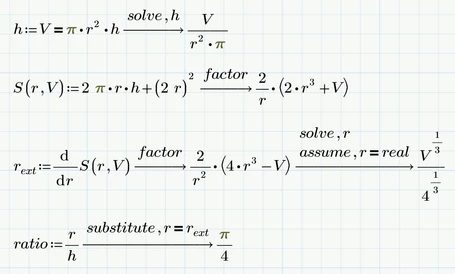
Concerning your calculation IMHO you are using cut and paste far too often - that's quite failure prone. Whenever possible you should avoid it by assigning results to variables and functions:
Werner_E_1-1594258489671.png

BTW, the screenshot above was done in Prime 6 (using the new symbolic, but it worked using the more powerful old one, too). If it doesn't work for you, you should probably check the labels of your various variables "r". Primes autolabeling often is more of a PITA than helpful.



1 reply

Werner_E25-Diamond IAnswer
25-Diamond I
July 9, 2020

One can argue about the missing simplification of some expressions in your picture (e.g. the derivative), but that's nothing I would call an error.

One may also argue that the solution is ignoring the need of additional surface material for adhesive tabs. But then that's not an error in Fig. 2.

Another thing we could moan about is that in the last line the r on the left hand side of the equation was not substituted. This sure was done on purpose by using different styles for the r's, but from a purists view one might say that if you write "substitute,r=..", every r has to be substituted. I wouldn't call that an error, though.

The only "error" I can spot is that pi/4 IS NOT EQUAL to 0.785, its only an approximation.

Unfortunately in Mathcad and Prime we cannot show an approximate numeric evaluation with the correct symbol

Werner_E_0-1594258370841.png

I missed that feature quite some times in the past now and then.


Concerning your calculation IMHO you are using cut and paste far too often - that's quite failure prone. Whenever possible you should avoid it by assigning results to variables and functions:

Werner_E_1-1594258489671.png

BTW, the screenshot above was done in Prime 6 (using the new symbolic, but it worked using the more powerful old one, too). If it doesn't work for you, you should probably check the labels of your various variables "r". Primes autolabeling often is more of a PITA than helpful.


24-Ruby IV
July 12, 2020

Yes! the pi/4=0.785 was a red rag for the bull, pardon, for this professor.

pi=3.14 - no problem but pi/4=0.785 - problem!

One solution

pi.png

25-Diamond I
July 13, 2020

@ValeryOchkov wrote:

Yes! the pi/4=0.785 was a red rag for the bull, pardon, for this professor.

OMG!


One solution

pi.png


Nice!