
1-Visitor
Solved

Need help with plotting column matrix for bode plot

Hi all,

I hope everyone is having a great day!

I am trying to plot a bode plot(i.e gain in dB w.r.t w in rads-1) at specific frequencies inputted in a vector/matrix. 

How then do I plot the column matrix('gaindB') with w(rad s-1) on the horizontal axis? 

The transfer function is given by f(s) where s represents laplace constant of j*w

I have attached my workings below. 
LucMeekesAnswer
23-Emerald V

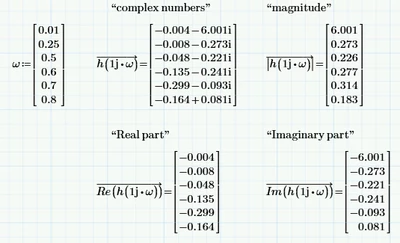
You have to vectorize your expressions (put an arrow above it, look that up in the 'Operators' section on the Math ribbon. It's in the lower-right corner:

LucMeekes_0-1615991044038.png

I'll leave the phase to you..

The table is easy to reproduce except for the argument at w=0.8. Note that the phase runs on negative continuously, but the argument of a complex number is generally limited to between -pi and pi, or -180 deg and 180 deg.


Success!
Luc

16 replies

23-Emerald I

Because gaindB is a vector taking the magnitude results in a scalar.  Vectorize:

Fred_Kohlhepp_0-1615815570943.png


Translate
1-Visitor

The numeric value on the right-hand side of each equation is substituted for the name on the left-hand side in the expressions that define the model. No checking is done during the substitution to determine whether the substituted value is valid.

Translate
23-Emerald I

Look up vectorize

Fred_Kohlhepp_0-1615894016056.png


Translate
23-Emerald V

Maybe this helps

LucMeekes_0-1615919355608.png


Success!
Luc


Translate
19-Tanzanite

How to put grid in the graph in Mathcad Prime for Bode Plot (Magnitude & Phase Plot's)?

Or is it only possible if we use a chart component or something like that?


Translate
23-Emerald V

The standard plot of Prime does not come with grids, but there are several methods to put in a grid.

The 3rd party add-on chart-component does provide grids, but it doesn't deal properly with units (as far as I know).

Here's the result of my grid routine

LucMeekes_0-1615928682317.png

Success!

Luc

Translate