1-Visitor
March 9, 2023
Solved

No 3D plot "must evaluate to real values"

  • March 9, 2023
  • 1 reply
  • 2362 views

Using Mathcad 3.1 under Windows 10.  Mathcad refuses to plot a two-variable function even though it will plot the same one-variable function with the other variable fixed.  "Cannot plot this function. It must evaluate to real values."  What is going on?  (File attached)

 

Best answer by Werner_E

@GordonHazen wrote:

That was a stupid error on my part, and thanks for the programming workaround.  However, the same problem occurs if I use pCure^alpha and restrict the axis ranges to 0.1 - 0.5 for pCure, and 1 - 3 for alpha.  See upload.


I agree that with this new function no error should be thrown and consider this another bug in Prime. Feel free to report it to PTC support.


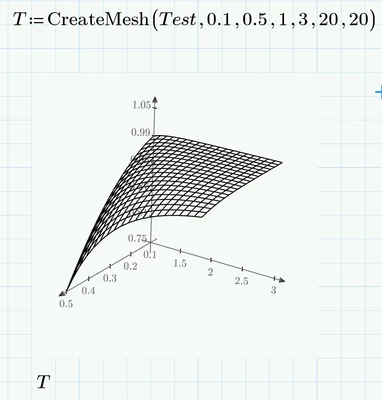
You may either use the workaround with try and catch shown above or I would suggest using the CreateMesh( ) function which also makes it obsolete to fumble around with the axis limits in the plot:

Werner_E_0-1678395525942.png


1 reply

25-Diamond I
March 9, 2023

As soon as p*alpha exceeds 1, the function must fail because p*alpha is a probability and cannot exceed 1.

Werner_E_0-1678382768734.png

A quick hack:

Werner_E_1-1678383006935.png

or

Werner_E_2-1678383163927.png


1-Visitor
March 9, 2023

That was a stupid error on my part, and thanks for the programming workaround.  However, the same problem occurs if I use pCure^alpha and restrict the axis ranges to 0.1 - 0.5 for pCure, and 1 - 3 for alpha.  See upload.

Werner_E25-Diamond IAnswer
25-Diamond I
March 9, 2023

@GordonHazen wrote:

That was a stupid error on my part, and thanks for the programming workaround.  However, the same problem occurs if I use pCure^alpha and restrict the axis ranges to 0.1 - 0.5 for pCure, and 1 - 3 for alpha.  See upload.


I agree that with this new function no error should be thrown and consider this another bug in Prime. Feel free to report it to PTC support.


You may either use the workaround with try and catch shown above or I would suggest using the CreateMesh( ) function which also makes it obsolete to fumble around with the axis limits in the plot:

Werner_E_0-1678395525942.png