
7-Bedrock
June 10, 2022
Solved

No data found for 3d plot

  • June 10, 2022
  • 3 replies
  • 3427 views

No matter what range i change i am not able to show 3d plot data. Anyways how's the range should be chosen for such scenarios 

Best answer by LucMeekes

"Is there any specific reason"


Yes, Prime will not accept a 3D plot from a matrix with just a single row. It's because it (deliberately or inadvertently) was implemented that way:
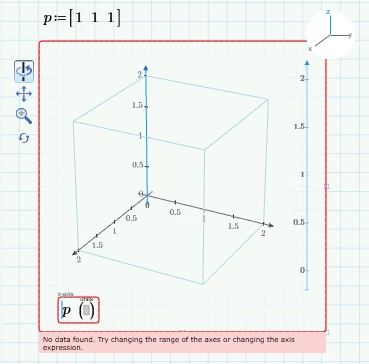
LucMeekes_0-1655033114738.png

The work-around (one of the many work-arounds that you need when working with Prime) for this shortcoming is to repeat the matrix row when you want to plot just a single point. This can be done by stacking:
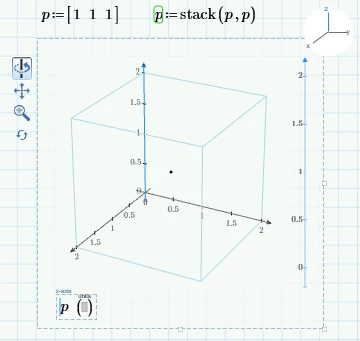
LucMeekes_1-1655033242789.png

Success!
Luc

3 replies

21-Topaz II
June 10, 2022

Hi,

It would appear you need at least two rows in the data to get a scatter plot!

Capture.JPG

Cheers

Terry

25-Diamond I
June 10, 2022

In real Mathcad plotting a couple of points was a bit awkward as it needed a nested matrix to do so. This was made a bit easier in Prime.

But Mathcad would also allow to plot a single point and this seems to be broken in Prime. On the other hand, the plot abilities in Prime, and especially the 3D plots, are not really to be taken seriously anyway.

A simple workaround, if you really want to use Primes 3D plot and plot a single point, is to plot the same point twice 😉

Werner_E_0-1654899330749.png


7-Bedrock
June 12, 2022

Is there any specific reason the same point needs to be plotted twice?

LucMeekes23-Emerald IVAnswer
23-Emerald IV
June 12, 2022

"Is there any specific reason"


Yes, Prime will not accept a 3D plot from a matrix with just a single row. It's because it (deliberately or inadvertently) was implemented that way:

LucMeekes_0-1655033114738.png

The work-around (one of the many work-arounds that you need when working with Prime) for this shortcoming is to repeat the matrix row when you want to plot just a single point. This can be done by stacking:

LucMeekes_1-1655033242789.png

Success!
Luc

ttokoro
21-Topaz I
21-Topaz I
June 10, 2022

image.pngimage.pngimage.pngimage.pngimage.png

t.t.