
8-Gravel
Dec 2, 2022 9:08 PM UTC
Solved

No print to PDF, or any other printer option showing

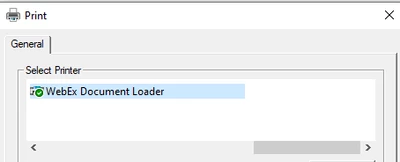
None of my printer options are available in Prime 6.0, is this normal?


This is what I see in Prime 6.0:
bsatola_1-1670015116355.png


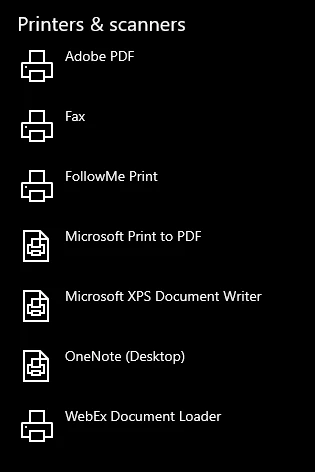
These are the drivers on my computer:
bsatola_0-1670014959781.png


I would expect Adobe PDF to show up in Mathcad too. I see this article from PTC "How to create PDF of worksheets from Mathcad and Mathcad Prime", but is that really the only solution? Export to rich text > open in rich text editor > print to PDF cannot be the only workflow (i.e., 3 steps involving 3 different applications every time I want to print to PDF - what!?)


I tried repairing and reinstalling Mathcad and Adobe, but Adobe PDF driver still does not show up as an option. Does anyone know if printing directly to PDF is supported in Prime 6.0, and how to fix it if it is?
LucMeekesAnswer
23-Emerald V
Dec 2, 2022 9:45 PM UTC

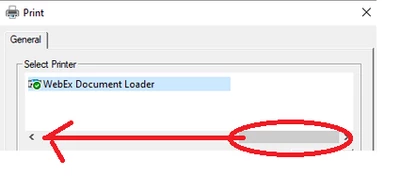
Maybe you should slide  the bar to the left:

LucMeekes_1-1670017511031.png

to see the other printers...?


Success!
Luc


4 replies

LucMeekes23-Emerald VAnswer
23-Emerald V
Dec 2, 2022 9:45 PM UTC

Maybe you should slide  the bar to the left:

LucMeekes_1-1670017511031.png

to see the other printers...?


Success!
Luc


Translate
bsatola8-GravelAuthor
8-Gravel
Dec 5, 2022 2:24 PM UTC

LOL, I had such a good laugh. That was exactly right. ¯\_(ツ)_/¯

Translate
DJNewman
19-Tanzanite
Dec 2, 2022 11:45 PM UTC

Print-to-PDF is as of Prime 7 and on.

Translate
PTC Marketer for Creo and Mathcad. I run their YouTube channels, some Creo campaigns, and all Mathcad campaigns and communications.
24-Ruby IV
Dec 3, 2022 5:48 PM UTC

1. Try to set the default printer in your system - "Adobe PDF" printer.
2. Install an additional PDF printer, for example: https://www.cutepdf.com/index.htm

Translate