4-Participant
March 17, 2023
Solved

No solution on Minimize function

  • March 17, 2023
  • 1 reply
  • 3738 views

Hi,

I tried to calculate minimal value of the complex argument of a Transfer function through minimize function inside a resolution bloc. Mathcad indicates that there are no solution found, try to modified initial values or TOL or CTOL, but it does not help.


I think that Mathcad does not find solution because the argument does not change, but manual calculation gives different values according constraints.

Could you please help me to understand why the Mathcad do not understand the constraints?


Thanks


Christophe


PS : Using Pime 4.0


Best answer by terryhendicott

Hi Christophe,

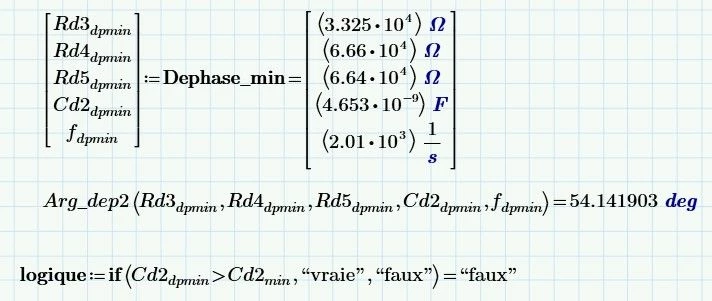
Calculations are 3.3x10^4 to 4.653x10^-9 this is a wide spread and lower than the TOL or tolerance setting..

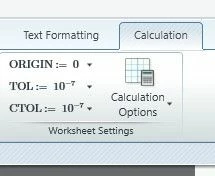
TOL is set at 10^-3 in your sheet and this cannot handle the spread of data you need.

Capture.JPG

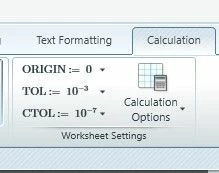
Set the value of TOL to 10^-7

Capture4.jpg

Calculations will then be as expected

Capture5.JPG

My files are Prime 9 so cannot be opened in Prime 7.  Your last posted sheet works when you reset the TOL value.

Cheers

Terry

1 reply

21-Topaz II
March 17, 2023

Hi Christophe

I am using Prime 9 so cannot save the file for you.  Will use pictures.  Enclosed Prime 9 file.

Prime works from left to right, top to bottom so definitions of variables need to be to left or above where they are used.

In the minimize function the first argument is a function name only.  arg function needs to be in definition of that function not in minimize function.

To be used as a constraint f must occur in the function so it varies in the solve block.

Capture.JPG

Capture2.JPG

Cheers

Terry

4-Participant
March 17, 2023

Hi Terry,


Thank you very much to your quick answer. It help me to understand severals points :

- how to fill the resolution block

- why using function instead of the arg function.


However, my need is the minimum argument value. In my case, the result is false because a constraint is not observed (Cd2).

From my file, could you explain me why this constraint is not respected ?


Thanks


PS : Do you know if I can install on my PC prime 7 (last revision available in my company that could help me to open your file), prime 4 (revision installed on all co-worker) and mathcad 15 (for all old project) ? 


Christophe

21-Topaz II
March 17, 2023

Hi Christophe,

Calculations are 3.3x10^4 to 4.653x10^-9 this is a wide spread and lower than the TOL or tolerance setting..

TOL is set at 10^-3 in your sheet and this cannot handle the spread of data you need.

Capture.JPG

Set the value of TOL to 10^-7

Capture4.jpg

Calculations will then be as expected

Capture5.JPG

My files are Prime 9 so cannot be opened in Prime 7.  Your last posted sheet works when you reset the TOL value.

Cheers

Terry