1-Visitor
January 2, 2021
Solved

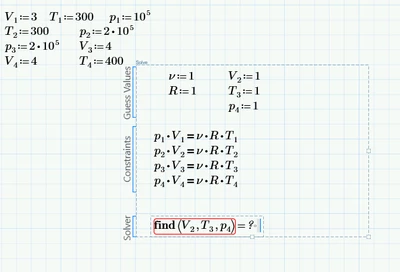
No solution was found(solve block)
  • January 2, 2021
  • 2 replies
  • 4131 views

TS_9501702_0-1609598620751.png

They all have solutions as I checked them manually. I have no idea why this is not working.. I tried changing the guess values to the actual solutions and it is still not working.


Thank you in advance!

Best answer by Fred_Kohlhepp

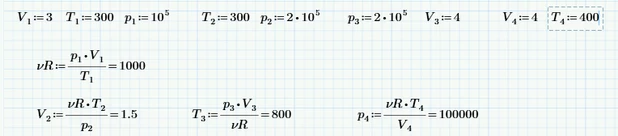
You don't really need a solve block:

Fred_Kohlhepp_0-1609603324934.png

I suspect that if you add nu and R to the Find expression, the solve block will work.  (Attached Prime 4.0)


2 replies

25-Diamond I
January 2, 2021

Always attach your worksheet additionally to the picture (and include the values you expect as solution).


Just three unknowns you are looking for, but four equations! Usually there exists no solution with that combination.

Just look at your first equation - none of the three unknowns you'd like to find appear in that equation and with the defined values this equation is false!


Why did you place the definitions for "R" and "v" in the guess values section of the solve block? Those variables don't show up in the "find" command, so Prime does never change their values. If you want Prime to do so, you must also put them in the "find" command. This would result in four equations in five variables - usually solvable but generally not with a unique solution, but an infinite number of solutions. Sou you could add an additional constraint.


1-Visitor
January 2, 2021

When you solve it by hand you have to divide 1 equation by the other and isolate the requiered unknown value. I don't know if I explained it right but you can see it in the worksheet. If I manually type it like that it isn't really how the teacher wants me to solve it.


TS_9501702_0-1609602968715.png


Maybe this is not the right method for Mathcad for what I need.


PS: When I try to add the mctx file it gives me an error and I don't know what to do 😞 sorry


PSS: Moved the R and V outside the solve block. They don't really matter. They should cancel each other out when you divide one equation by the other.

23-Emerald I
January 2, 2021

You don't really need a solve block:

Fred_Kohlhepp_0-1609603324934.png

I suspect that if you add nu and R to the Find expression, the solve block will work.  (Attached Prime 4.0)


1-Visitor
January 2, 2021

Yeah that's how we normally solve that on paper. But I think that we are supposed to solve it using some tools Mathcad offers. We are learning Mathcad in this course.


EDIT: Wow, adding R and V to the find function actually worked. Thanks!