
12-Amethyst
May 3, 2017
Question

Not enough memory for this operation! batch reading of "big" files

  • May 3, 2017
  • 3 replies
  • 4450 views

Hi everyone,

I seem to be here relatively oft in the last times. 

I am trying to write a file-reading-loop where a certain number of files (in different directories) are read one after the other and processed in a certain way, then the results should be written out to a "summary" file.  Now, a prototype worksheet works for a single file, even the biggest of them.  But when I start the "loop", after a while I get the infamous message "not enough memory for this operation". With Task-Manager I have looked at the memory requirements, and they stay to 14%! The following snapshot was taken immediately after receiving the error message and it is showing memory used 14%.
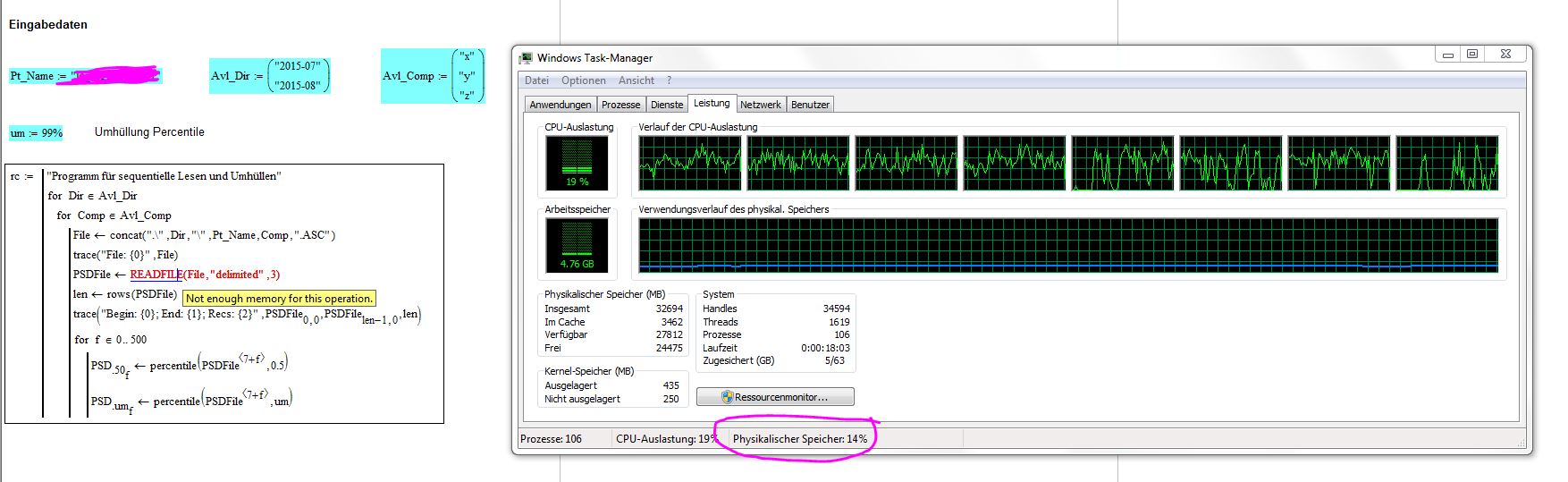
nem.JPG

Does someone know how could I avoid this problem? either "telling" Mathcad that it should use more memory, or somehow in my algorithm "clearing" the memory after each file read? because I do not need to have all files in memory, actually all what I need, is the capability to program a loop in order to perform the same operations on many different files.  So each new READFILE actually overwrites the previous one in memory, and it should not need more memory (the result of READFILE is loaded into the variable PSDfile, every iteration).

thanks for any help & best regards

Claudio

PS: I' not posting the Mathcad-Worksheet (at least at this stage) because it works only with my specific data files.

PS2: I have a few debug statements, but the problem happens also with debug turned off.

3 replies

25-Diamond I
May 3, 2017

Its nice you have 32 Gig of Mem in your machine, but unfortunately Mathcad 15 can't take advantage of it - its architecture is too old. Prime should circumvent that limit but has (too) many other drawbacks, restrictions.and limitations.

I don't known if there is a way to influence Mathcad's garbage collection.

Using READFILE you can specify the start and end row to read, so you could read in the file in smaller portions.

This would complicate your program and I am not sure if this would really help to prevent that error.

Whats the file size, number of rows, of your six data files?

Guess we would need your worksheet and all data files to play with.

Another idea which comes to mind is that you could put the reading and processing of 1 file in another program which then is called from within your main program. The memory occupied by the file should be freed at least when the (sub) program is left. Again - its just an idea you may consider, no guarantee for success.

12-Amethyst
May 4, 2017

By the way, Werner,

when you say "reading and processing of 1 file in another program which then is called from within your main program."

do you mean something like this?

nem2.JPG

I just moved the reading out, because it is there that the problem happens...

unfortunately this does not help. Now I will try to put the complete processing inside the loop in another program...

Regards

Claudio

12-Amethyst
May 4, 2017

Unfortunately it does not work even with the complete processing in a different program.

nem3.JPG

12-Amethyst
May 4, 2017

Hi Werner, thanks!

You are basically confirming my thought, about memory. That's a pity! And for Prime... I agree with you.

Concerning the files (I am not going to post them, for proprietary reasons and because it would simply be too complicated, they are in different subdirectories and so on). They contain power spectral densities of a vibration measurements, each line has a time stamp, a few general information and then 500 values (0, 1, 2... 500 Hz).

In the test that I am running as first example, the files are:

For the first subdirectory  three x,y,z-Files: 2900 lines each = 8 MB each

For the second subdirectory (where the out of memory problem arises): 19500 lines = 57 MB each

I am having a partial success with the selection of the columns to read.  But I would like to wait if someone else in forum can suggest better.  Anyway limiting the frequency to 400 Hz (instead of the available 500 Hz) the program ends correctly. Only one time ... then I have to close Mathcad and restart it!

So now the program looks like this and works with the input shown:

nem1.JPG

Regards

Claudio

12-Amethyst
May 5, 2017

Just to give back something to the forum, I am posting here the final version in a simplified form (but without the input files, of course). Maybe it could be useful as a starting point for someone else having a similar problem.  Basically the purpose is to read in batch a few files with structured names in given subdirectories of the working directory, make some statistic processing on them and append one line of summary to "high-level" summary files with appropriate names in the working directory.

Thanks a lot to Werner Exinger‌ for the precious help and advice.  I also added a personal modification that finally made the limitation on the number of rows unnecessary. Namely substituting READFILE("delimited") with READCSV (actually, they do the same, for "delimited" files, I think).  But as a matter of fact, with READCSV everything goes a little faster and I did not need to reduce the number of records read (in my example).

Of course if someone knows a good method to reduce memory occupation (in the sense of garbage collection), I would anyway appreciate to know.

Regards

Claudio