
10-Marble
October 19, 2025
Solved

Not getting the results as J <---- J+1 not doing well

  • October 19, 2025
  • 3 replies
  • 2695 views

I am working on a sample to develop my calculations.

I used both If .. Then and While.

But, I can get the results: J is not adding up. Looks like J keeps remaining at 1.


I request help.


Best answer by Werner_E

Your programs don't show what you intend to do if the function argument x is not exactly in the list of nominal diameters.
The programs (with Terry's fix applied) will return just the last value of j in this case (15).
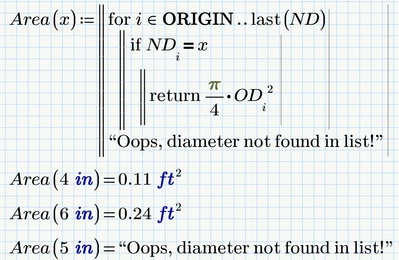
If, as I assume, that's not intended, you could simply place the return value you want to see in case of an invalid x in the last program line, like:
Werner_E_5-1760878693857.png


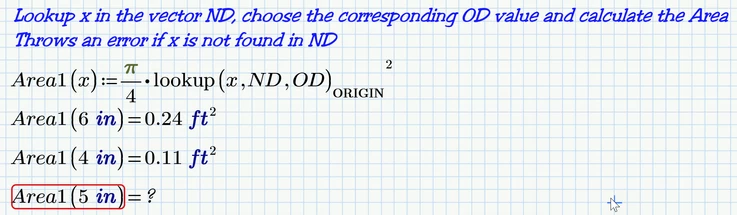
To achieve what you obviously intend to do (take the nominal diameter ND, lookup the corresponding outer diameter OD and use it to calculate the cross-sectional area) could more easily be done using the "lookup" function:
Werner_E_0-1760877012952.png

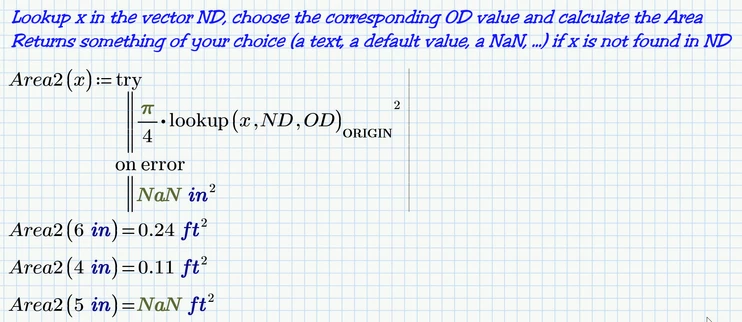
To avoid the error in case x is not in the list you could add your own return value in case lookup fails:
Werner_E_1-1760877084765.png

I think that returning the index j as well was done just for debugging. But in case you really need that index you could use the "match" function (see attached sheet).

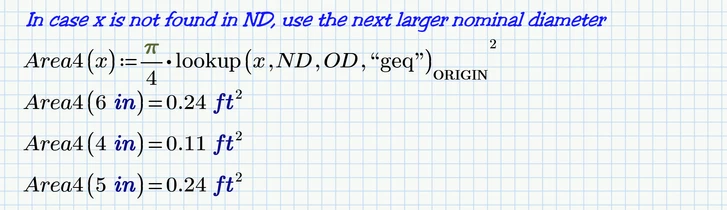
You may also just use the next larger value in ND in case x is not found in that list
Werner_E_2-1760877281033.png

Similarly you could also decide to use the next smaller value or the nearest value (see attached sheet).

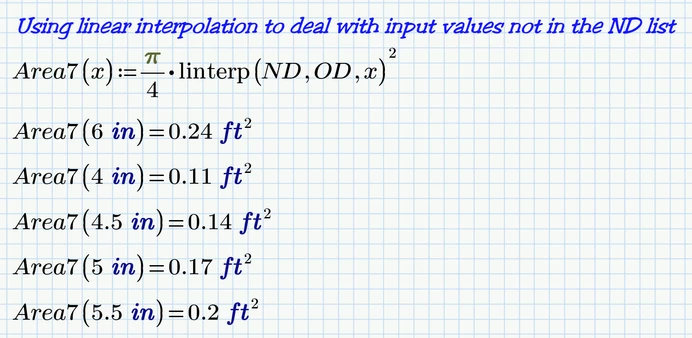
And of course a further option would be to use linear interpolation to deal with x-values not in the ND-list.
Werner_E_6-1760878723404.png

Prime 11 file attached

3 replies

21-Topaz II
October 19, 2025

Hi,

The comparison equals is a bold equals sign and is entered by the following keys together [CTRL][equal  sign].

Capture.JPG

Cheers

Terry

Werner_E25-Diamond IAnswer
25-Diamond I
October 19, 2025

Your programs don't show what you intend to do if the function argument x is not exactly in the list of nominal diameters.
The programs (with Terry's fix applied) will return just the last value of j in this case (15).
If, as I assume, that's not intended, you could simply place the return value you want to see in case of an invalid x in the last program line, like:

Werner_E_5-1760878693857.png


To achieve what you obviously intend to do (take the nominal diameter ND, lookup the corresponding outer diameter OD and use it to calculate the cross-sectional area) could more easily be done using the "lookup" function:

Werner_E_0-1760877012952.png

To avoid the error in case x is not in the list you could add your own return value in case lookup fails:

Werner_E_1-1760877084765.png

I think that returning the index j as well was done just for debugging. But in case you really need that index you could use the "match" function (see attached sheet).

You may also just use the next larger value in ND in case x is not found in that list

Werner_E_2-1760877281033.png

Similarly you could also decide to use the next smaller value or the nearest value (see attached sheet).

And of course a further option would be to use linear interpolation to deal with x-values not in the ND-list.

Werner_E_6-1760878723404.png

Prime 11 file attached

RWickrama10-MarbleAuthor
10-Marble
October 19, 2025

Thanks for the great help. Help to improve Mathcad programming.

I rarely use MathCAD. But, I will try to use often.

RWickrama10-MarbleAuthor
10-Marble
October 25, 2025

I got to work on my calculations comfortably. I thank everyone for the help.

Attached here to is one of my final calculation, but WIP: I need to add some images from a Revit model.