8-Gravel
January 22, 2024
Solved

ODE error

  • January 22, 2024
  • 3 replies
  • 4876 views

Hello,

I am using Adams to solve the differential equations as below but failed, may anyone could suggest how to solve it or should I use another equation.The error can only disappear when x was deleted in the equation.

.

PW_10297783_1-1705961895174.png,x from 0 to 10000


Thanks in advance.

PW

Best answer by Werner_E

Your sheet is still missing - its not attached.

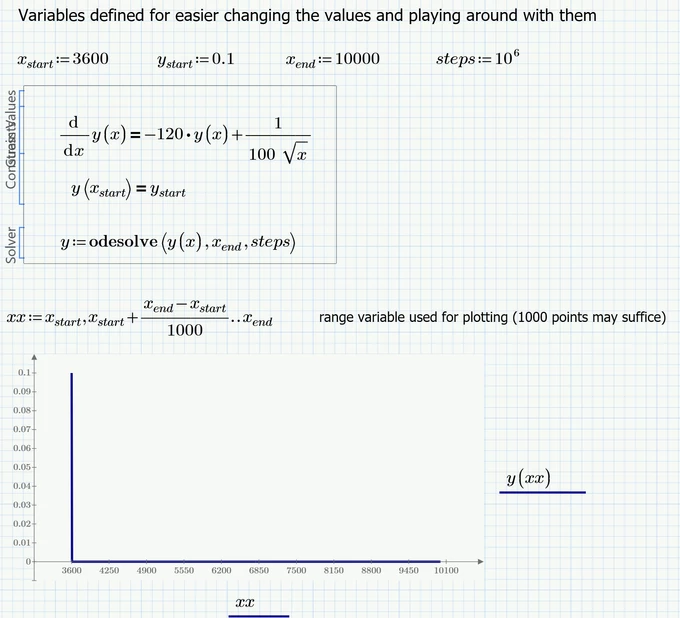
I see that you changed the initial value for x significantly now from 0 to 3600!

In Prime you would have to use the commands inside of a solve block!

The syntax for odesolve had changed, too, from legacy Mathcad to Prime (look it up in the help):

Werner_E_1-1706026793157.png


The attached file is in Format of Prime 6., so you should be able to open it with P7.

3 replies

25-Diamond I
January 23, 2024

You have to write y(x), not just y.

Furthermore I guess you will run into problems because the right hand term is not defined for the start value x=0 (division by zero).


I changed the start value to x=10^-10 and it works OK.

Here done in Mathcad 15 using "odesolve" with Adams/BDF chosen as algorithm.
I let x only run up to 1000 - you can see that y approaches zero continually.

Werner_E_0-1705971602764.png


For further questions please attach your worksheet, not just a picture. And in case you are using Prime also state which version.

8-Gravel
January 23, 2024

Thank you Werner,

Please fine my error enclosed.I am using Prime 7.0.

PW_10297783_0-1706025335242.png


Thank for guiding me how to proceed.

PW

Werner_E25-Diamond IAnswer
25-Diamond I
January 23, 2024

Your sheet is still missing - its not attached.

I see that you changed the initial value for x significantly now from 0 to 3600!

In Prime you would have to use the commands inside of a solve block!

The syntax for odesolve had changed, too, from legacy Mathcad to Prime (look it up in the help):

Werner_E_1-1706026793157.png


The attached file is in Format of Prime 6., so you should be able to open it with P7.

23-Emerald IV
January 23, 2024

The differential equation:

LucMeekes_1-1706006192435.png


Has solution:

LucMeekes_6-1706014251553.png

Now with:

LucMeekes_0-1706014384173.png

we know c also.

So:

LucMeekes_1-1706014505825.png

We can compare the numeric solution

LucMeekes_2-1706014601400.png

with the exact solution:

LucMeekes_3-1706014623951.png

The difference is:

LucMeekes_4-1706014656114.png

Success!
Luc


25-Diamond I
January 23, 2024

Forgot to mention that in case you are using a current version of Prime, the ODE can also be solved symbolically

Werner_E_0-1706021356120.png

It also looks like we could add an initial condition

Werner_E_1-1706021394768.png

But the first attempt using a numeric value failed

Werner_E_2-1706021450242.png

Using 1/10 instead of 0.1 does the trick:

Werner_E_3-1706021551583.png

Werner_E_4-1706021576967.png

Werner_E_0-1706021713525.png


Using the prime symbol for the derivative you may even omit the function argument x, but I won't suggest doing so

Werner_E_0-1706021993403.png


8-Gravel
February 5, 2024

May you upload your file for symbolical solution in your free time please,I am not able to proceed with the mistake below


PW_10297783_0-1707138184622.png


Thanks

23-Emerald IV
February 5, 2024

Prime 7 does not support solving differential equations symbolically. You have to upgrade to Prime 9 for that.


Success!

Luc