1-Visitor
September 13, 2018
Solved

ODE solve tolerance

  • September 13, 2018
  • 5 replies
  • 11479 views

Greetings!

I am solving a pair of odes using mathcad built in odesolve function. I want to know if there is a way to alter the default tolerance and number of iterations of this function.

Because when i solve it its gives a statement that solution is not converging to a solution refer to Help.


Thanks.

Best answer by Werner_E

You can change the tolerance via the menu or by typing TOL:=... at the top.

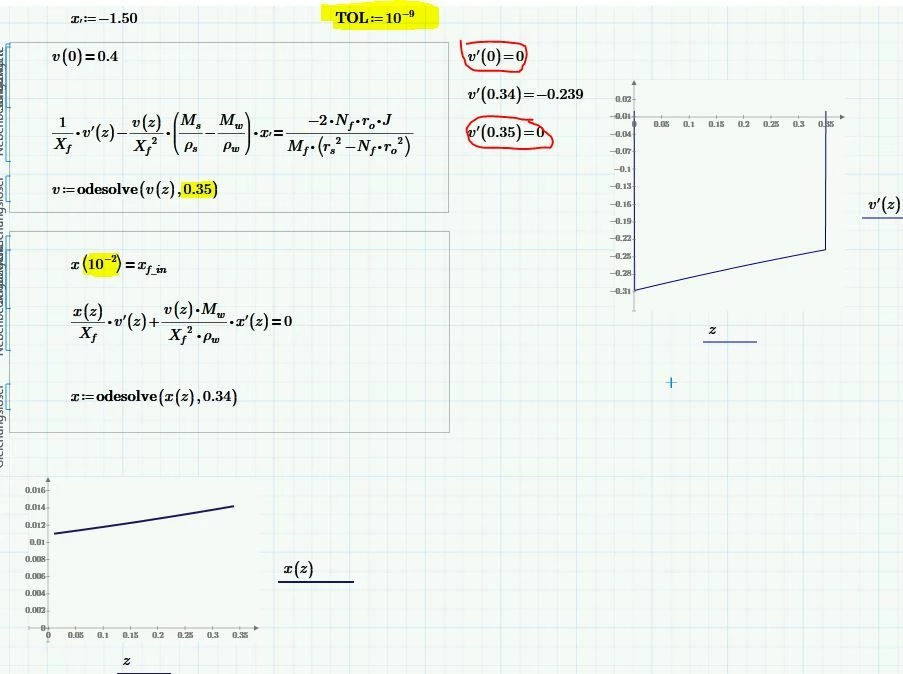
But the problem is that the numerical derivative of v is not defined at the end values (0 and 0.34) - its wrongly set to 0!.

So you may extend the ends a little bit like shown in the picture to make it work.

B.JPG


5 replies

19-Tanzanite
September 13, 2018

You can change the value of TOL.  Set TOL:=10^-6 say (the default value is 10^-3). 


However, this might not be the root cause of your problem.  There are many reasons why the solution might not converge.  It would be a good idea to upload your worksheet so the community can investigate.


Alan

24-Ruby IV
September 13, 2018

@Asad wrote:

Greetings!

I am solving a pair of odes using mathcad built in odesolve function. I want to know if there is a way to alter the number of iterations of this function.


Thanks.


May by so

Odesolve(y, t, [number of iterations])

Asad1-VisitorAuthor
1-Visitor
September 17, 2018
I am using mathcad prime 2.0 to solve the ODEs. In the solve block I have typed x:=odesolve(x(z),0.47,1000000000) and now it gives a new error that there is not enough memory for this calculation. I am uploading the work sheet, help would be highly appreciated! A little about the ODEs: there are two varibles velocity (v) and concentration (x) that are varying along the z-axial direction. Taking an initial guess for dx/dz in the first equation to obtain and answer for v and dv/dz. Then using the answers obtained in last step I put them in the second equation to solve for x and dx/dz. After successfully getting an answer I will then make a mathcad while loop with these solve blocks and iterate them until a desired solution is obtained. Thanks
Asad1-VisitorAuthor
1-Visitor
September 17, 2018

and if i put another zero

x:=odesolve(x,0.47, 10000000000)


it says found a number with a magniture greater than 10^307 while trying to evaluate this expression

21-Topaz II
September 13, 2018

Hi Asad,

Have you tried to change algorithm?

Ode options.jpg

24-Ruby IV
September 14, 2018

@-MFra- wrote:

Hi Asad,

Have you tried to change algorithm?


 Only in Mathcad 15!

Asad1-VisitorAuthor
1-Visitor
September 18, 2018

RIght! So a combination of both of your solutions worked for me and if the solution does not converge I just alter the starting and ending points of the boundary conditions.


I worked on it and:

v:=odesolve(v(z),2,100000000) with v(0)=0.4

x:=odesolve(x(z),1.2,1000000) with x(10^-307)=x_in


then for the second iteration

v:=odesolve(v(z),0.9) with v(10^-306)=0.4

x:=odesolve(x(z),0.47) with x(10^-305)=x_in


Thanks a lot for the help!

Asad1-VisitorAuthor
1-Visitor
September 18, 2018

Also, is there any other function besides odesolve to solve the differential equations like the ones stated in comments such as radau or any other. For better accuracy..

25-Diamond I
September 18, 2018

As was already written in contrary to Mathcad 15 and below we can not manually chose the algorithm used by odesolve - we have to rely on the automatic selection.

For other ways to solve ODEs numerically you may look up the various function in the help.

See the attached picture.

Asad1-VisitorAuthor
1-Visitor
September 19, 2018

Can you send me your worksheet file in which you have set the initial and final boundary conditions for the derivative of v.

The worksheet of the picture you posted.


Thanks!