Odesolve "This value must be a function" error
- 23 replies
- 61947 views
- Translate All
Good evening, everyone.
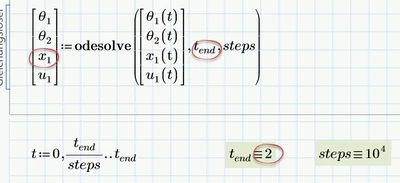
I was working on a model in Mathcad today. Unfortunately, I keep getting an error message every time. To prevent errors, I have removed all units. I have double-checked the function, but I can't seem to find the error. The error message I'm getting is "This value must be a function." I would say that this might be in the theta1(t), z2(t), and theta2(t).
I have already reviewed the steps below:
Check the ODEs: Make sure that the ODEs you are trying to solve are properly defined as functions of the independent variable (usually time) and dependent variables. For example, if you have an ODE like dy/dt = f(t, y), make sure that f(t, y) is a valid function.
Correct Function Format: Ensure that the functions used in your ODEs are defined correctly. Mathcad Prime requires well-defined functions with proper syntax. Double-check your function definitions, including parameter lists and mathematical expressions.
Function Inputs: Confirm that you are passing the correct arguments to the Odesolve function. The first argument should be a vector of ODEs, the second argument should be the list of dependent variables, and the third argument should be the initial conditions.
Units and Dimensions: Verify that the units and dimensions of your equations are consistent. In Mathcad Prime, inconsistencies in units can cause errors. Ensure that all units match up correctly.
I think I've probably made a small mistake, but I can't find it
Thank you in advance for your help, and I appreciate your assistance.