
4-Participant
Sep 17, 2026 5:19 AM UTC
Solved

Odesolve within a loop

Hi,

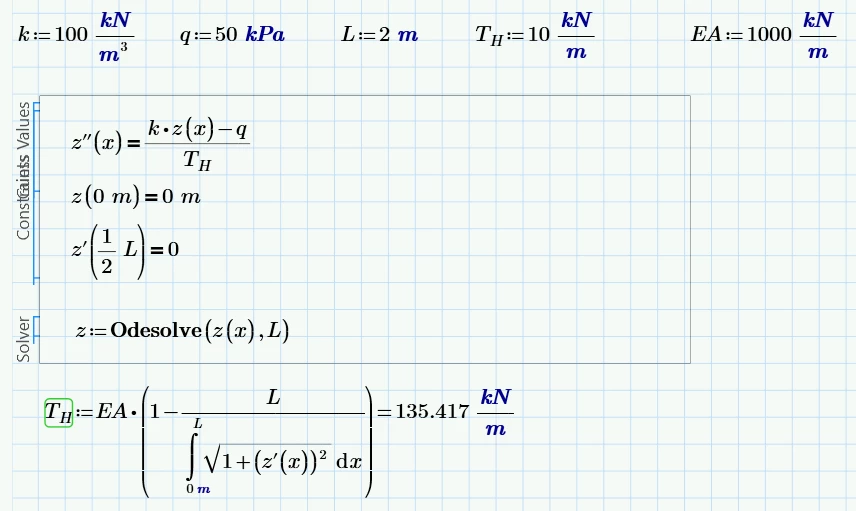
I am trying to solve variable T_H, starting with a guess value of for example 10 kN/m. With this value z(x) is solved using Odesolve, then T_H is evaluated and a new value of 135 kN/m is found. This iteration continues until the correct value of T_H is iterated. Could someone please guide me on how to correctly implement this in Mathcad?


19-Tanzanite
Sep 17, 2026 10:22 AM UTC

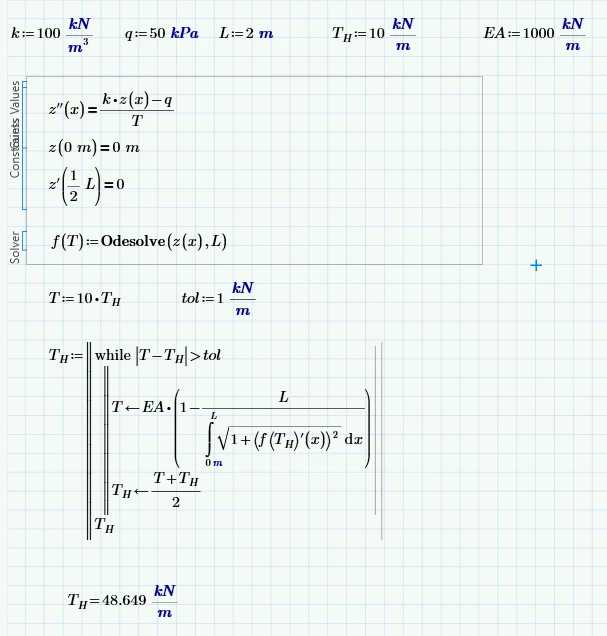
Here’s a way avoiding the Given Find problem:


5 replies

Werner_E
25-Diamond I
Sep 17, 2026 9:40 AM UTC

You don’t need to write the program loop for the iteration yourself - you may use a solve block with “find”. 

But first you should parametrize your solveblock, turning z into a function of T.H.

Then use this function in a second solve block with “find” to get the value of T.H.

Here is the solution done in legacy Mathcad 15 (I have no access to a full Prime version).
Solve blocks look different there, the syntax for odesolve is different and in odesolve unfortunately no units are allowed:


Translate
4-Participant
Sep 17, 2026 10:07 AM UTC

Thanks for your reply Werner, unfortunately in Prime this is not working (also tried the alternative notation you purposed). I would appreciate if you have any additional suggestions. 


Translate
19-Tanzanite
Sep 17, 2026 10:22 AM UTC

Here’s a way avoiding the Given Find problem:


Translate
4-Participant
Sep 17, 2026 10:44 AM UTC

Thank you Alan and Werner, the problem was solved combining both your answers: 


Translate
Werner_E
25-Diamond I
Sep 17, 2026 7:37 PM UTC

Glad you found a solution.

I suspected that Prime would not accept z(T,x) or z’(T,x) but wasn’t sure about an alternative. I would have expected the alternate way using the 2-liner to work in Prime as well but had no way to try it myself. 
I am a bit surprised that Prime allows z(T)’(x) - nice!


Translate