
1-Visitor
October 19, 2015
Solved

One condition for multiple variable

  • October 19, 2015
  • 2 replies
  • 3319 views

Hi

How to solve for multiple variable with one condition?

for example: how to solve this problem using mathcad program, I use mathcad prime 3.0

if n>2

m=x+y+z

n=x+y

p=x-y-z

else

m=x*y*z

n=x*y

p=x*y/z

I know how to solve one variable with multiple conditions using "if condition" in Mathcad. i.e

m=if n>2 then.........if else.........else............

In this example I have accommodated few conditions for one variable. But in above program, there is one condition for few variables. and I don't want to use separate "if conditions" for each of the variable. I want to use one condition for each variable in one formula/block, if possible.

Thanks

Jahangir Hossain
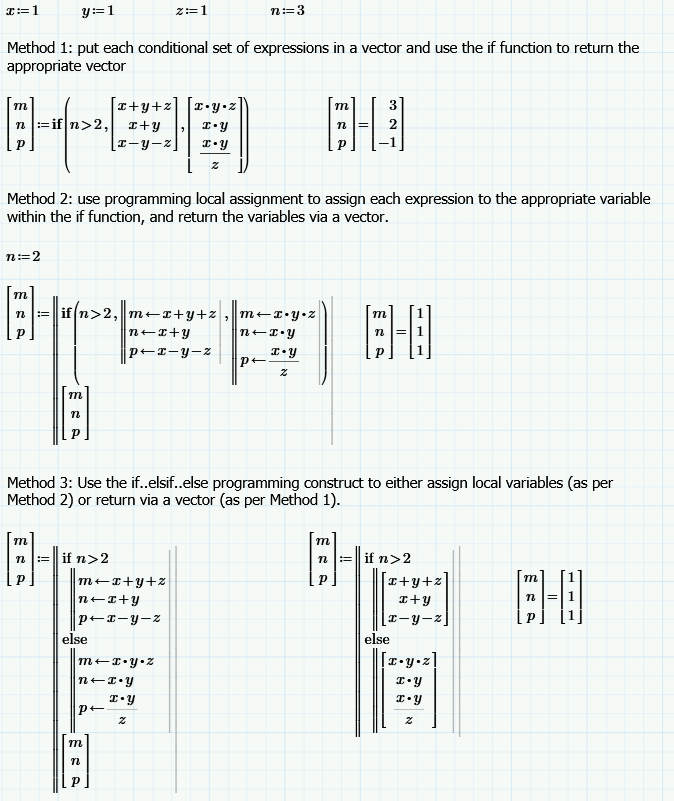
Best answer by StuartBruff

Jahangir Hossain wrote:

Hi

How to solve for multiple variable with one condition?

for example: how to solve this problem using mathcad program, I use mathcad prime 3.0

if n>2

m=x+y+z

n=x+y

p=x-y-z

else

m=x*y*z

n=x*y

p=x*y/z

I know how to solve one variable with multiple conditions using "if condition" in Mathcad. i.e

m=if n>2 then.........if else.........else............

In this example I have accommodated few conditions for one variable. But in above program, there is one condition for few variables. and I don't want to use separate "if conditions" for each of the variable. I want to use one condition for each variable in one formula/block, if possible.

I've got Prime 3.1, so posting the worksheet wouldn't be of much use to you, as Prime 3.1 files are not compatible with Prime 3.0.

Stuart

2 replies

23-Emerald I
October 19, 2015

Something like this?

jhossain1-VisitorAuthor
1-Visitor
October 20, 2015

Thanks Fred

It helped me.

23-Emerald V
October 19, 2015

Jahangir Hossain wrote:

Hi

How to solve for multiple variable with one condition?

for example: how to solve this problem using mathcad program, I use mathcad prime 3.0

if n>2

m=x+y+z

n=x+y

p=x-y-z

else

m=x*y*z

n=x*y

p=x*y/z

I know how to solve one variable with multiple conditions using "if condition" in Mathcad. i.e

m=if n>2 then.........if else.........else............

In this example I have accommodated few conditions for one variable. But in above program, there is one condition for few variables. and I don't want to use separate "if conditions" for each of the variable. I want to use one condition for each variable in one formula/block, if possible.

I've got Prime 3.1, so posting the worksheet wouldn't be of much use to you, as Prime 3.1 files are not compatible with Prime 3.0.

Stuart

23-Emerald V
October 19, 2015

... or use Fred's functional version of Method 3!

Stuart