3 replies

25-Diamond I
August 1, 2019

Here is Prime:

B1.png

24-Ruby IV
August 1, 2019

@Werner_E wrote:

Here is Prime:

B1.png


Attach pls Mathcad Prime sheet!

See Mathcad 15 file in attach.

25-Diamond I
August 1, 2019

@ValeryOchkov wrote:


Attach pls Mathcad Prime sheet!

See Mathcad 15 file in attach.


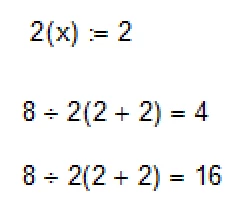
The file was never saved and is lost now but I kept a screenshot revealing the bold "secret".

BB.png

The last line shows how it looks legitimately from a display point of view. You may notice, the on contrary to real Mathacd, the result of prime is WRONG!!!! If we delete the explicit multiplication sign to make an implicit one, Prime gives a wrong result and obviously assumes a pair of parenthesis which is not there! An impicit and an explicit multiplication should give the same result (as its the case in Mathcad).

B2.png

Unfortunately it seems not to be possible to add a space in a variable or function name (as in your example in MC15).

BTW, the character ÷ can be input via ALT-246 (numeric key pad).

Have you tried to convert your MC15 sheet to Prime? What happens?

23-Emerald IV
August 1, 2019

And here it is in MsWord:

LM_20190801_Mc15Only.png


Luc

25-Diamond I
August 1, 2019

@LucMeekes wrote:

And here it is in MsWord:


So what comes next? Paint? 🙂

23-Emerald I
August 1, 2019

@Werner_E wrote:

@LucMeekes wrote:

And here it is in MsWord:


So what comes next? Paint? 🙂


MatLab?

24-Ruby IV
August 3, 2019

This example is interesting for Mathcad! Why?

See please one typical error in Mathcad:

f-MC.png

25-Diamond I
August 3, 2019