
12-Amethyst
May 21, 2021
Solved

Output a temperature in Excel-File in degrees Celsius

  • May 21, 2021
  • 1 reply
  • 2817 views

Hi everyone,

When I want to put a variable in an Excel-file, but with non standard units, for example mm instead of meters, I simply divide it in the input field (see example).  But what about a temperature? I have tried different ways but without success.

It always comes out as Kelvin.  I would like Celsius °C.
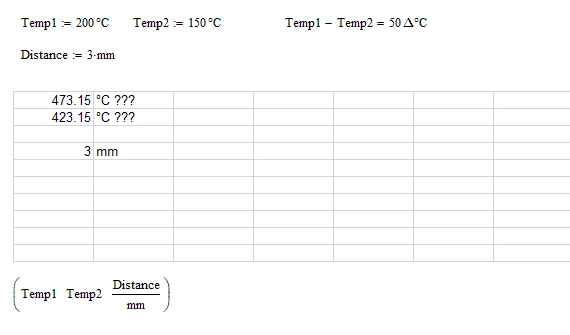
 

Unbenannt1.png

Basically the question is: how do I "adimensionalize" a temperature, that is reduce the value of temperature to a simple number, without units?


Thanks a lot in advance

Best regards

Claudio

Best answer by LucMeekes

I guess if you want to convert . a temperature value with °C unit . to no unit, you'll have to subtract 0 °C from the united value.


See if that works..


Success!
Luc

1 reply

LucMeekes23-Emerald IVAnswer
23-Emerald IV
May 21, 2021

I guess if you want to convert . a temperature value with °C unit . to no unit, you'll have to subtract 0 °C from the united value.


See if that works..


Success!
Luc

12-Amethyst
May 21, 2021

It does!

Thanks a lot Luc!

Unbenannt1.png

Again thanks and have a nice weekend! Claudio