1-Visitor
January 15, 2018
Solved

Output of function looks like an array... but can't be assigned to a variable

  • January 15, 2018
  • 3 replies
  • 2112 views

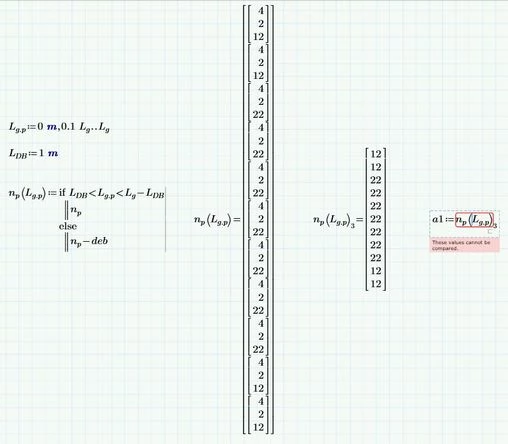
I am trying to assign the output of a function to a variable.  However, despite presenting the results correctly initially, it throws an error "These values cannot be compared" when I try to assign it.

What am I doing wrong?

Vector and Variable.JPG

Best answer by Werner_E

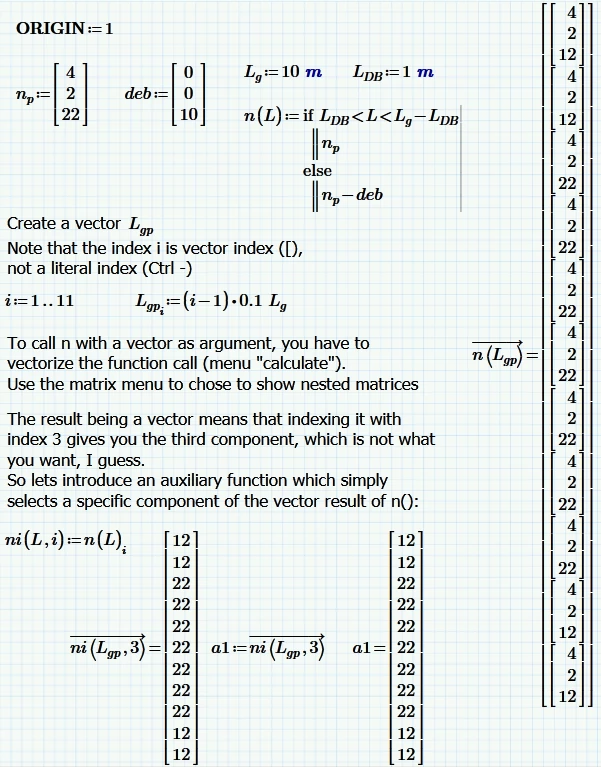
Your subject reads "Output of function looks like an array... but" and thats exactly what the problem is. What you get when you feed a range variable in your function ng  just looks like a vector but it isn't and thats reason you can't assign it a variable. There may be other ways to get the output you are looking for, but to follow your sheet you have to create a vector instead of a range and then feed this vector in your function ng. You will have to vectorize that function call to make this work.

BTW, it looks like you use ng both as name of a function and also as name of a variable. This is something you sure should avoid.

See if the following pic helps:
Unbenannt.PNG


3 replies

24-Ruby IV
January 15, 2018

Use please not a range variable but a vector.

Attach please the sheet!

And see please:

VVV.png

23-Emerald IV
January 15, 2018

As Valery said: Please attach the worksheet.

If you experience problems when attaching a Mathcad sheet file ( .mcd, .xmcd or .mcdx) to the message then zip it first.
To get the .zip file, use Windows Explorer, select the sheet file, right-mouse click and select "Send to" then "Compressed (zipped) folder". The resulting .zip file can be attached to a message.


Luc

Werner_E25-Diamond IAnswer
25-Diamond I
January 15, 2018

Your subject reads "Output of function looks like an array... but" and thats exactly what the problem is. What you get when you feed a range variable in your function ng  just looks like a vector but it isn't and thats reason you can't assign it a variable. There may be other ways to get the output you are looking for, but to follow your sheet you have to create a vector instead of a range and then feed this vector in your function ng. You will have to vectorize that function call to make this work.

BTW, it looks like you use ng both as name of a function and also as name of a variable. This is something you sure should avoid.

See if the following pic helps:

Unbenannt.PNG