4-Participant
October 3, 2025
Solved

Overriding document header from outside MathCad

  • October 3, 2025
  • 2 replies
  • 782 views

Hello

I am looking for a way to access and override the content of headers without starting MathCad. This is required for our document management system - once the file is officially issued the document management system needs to override the date, title, etc.


I do understand that MathCad files are zipped xml's and I could modify the values in the xml file but the header/footer text content does not seem to be available. 


Thank you in advanced

Michal
Best answer by Werner_E

@StuartBruff wrote:

What version of Mathcad did you use?  I can't find my text in any of the files.

I am using Prime 11.

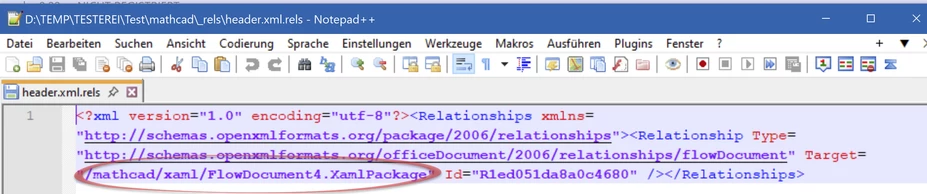
The reference to the FlowDocument#.XamlPackage containing the the text of the header resp. footer are in mathcad\_rels\header.xml resp. mathcad\_rels\footer.xml .

In the attached file test.mcdx (when renamed to *.zip) we can find in the file /mathcad/_rels/header.xml with the reference to /mathcad/xaml/FlowDocument4.Xamlpackage

Werner_E_0-1759606218460.png


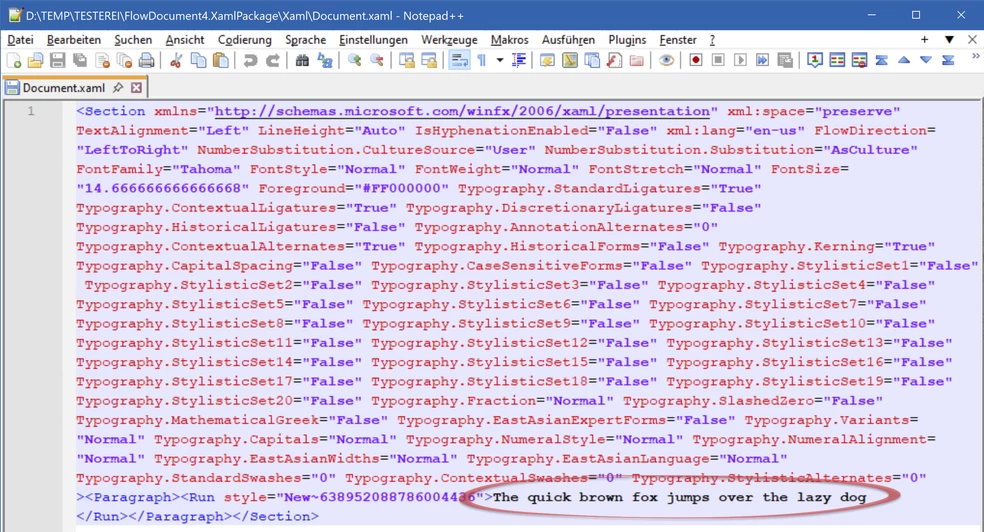
FlowDocument4.Xamlpackage is a zipped file again an when we unpack it we find in /Xaml/Document.xaml the text I used in the header

Werner_E_1-1759606435024.png

BTW, I am not sure how to get Notepad++ to display the file contents nicely formatted and not all in one line. Any ideas??


2 replies

25-Diamond I
October 3, 2025

That's tricky!

When you unzip a mcdx file you should see a directory "\mathcad\xaml\". In this directory you should see a couple of files with names "FlowDocument<x>.XamlPackage", where <x> is a number. These again are renamed zip archives!

When you unzip them you should get a directory "Xaml" and the file "Document.xaml" in this directory contains the text of the header resp. footer.

I just created a small test document and here the header text was found in "FlowDocument3.XamlPckage" and the footer text in the file with #4.

The numbers 3 and 4 may vary. They are referenced in "_rels\header.xml" and "_rels\footer.xml".

23-Emerald V
October 4, 2025

@Werner_E wrote:

That's tricky!

When you unzip a mcdx file you should see a directory "\mathcad\xaml\". In this directory you should see a couple of files with names "FlowDocument<x>.XamlPackage", where <x> is a number. These again are renamed zip archives!

When you unzip them you should get a directory "Xaml" and the file "Document.xaml" in this directory contains the text of the header resp. footer.

I just created a small test document and here the header text was found in "FlowDocument3.XamlPckage" and the footer text in the file with #4.

The numbers 3 and 4 may vary. They are referenced in "_rels\header.xml" and "_rels\footbleer.xml".


Interesting.  I've just created a Mathcad Express 11 worksheet based on the Blank template, adding only a header and footer.  The header comprises a math region and the filename.  The footer comprises a text region and the <page of pages> data.


I couldn't see the header and footer in _rels, but I did find them in mathcad.


2025 10 04 A.png


Here are their pretty-printed contents in Notepad++.


Header:

<header xmlns:xsi="http://www.w3.org/2001/XMLSchema-instance" xmlns:ve="http://schemas.openxmlformats.org/markup-compatibility/2006" xmlns:r="http://schemas.openxmlformats.org/officeDocument/2006/relationships" xmlns:ws="http://schemas.mathsoft.com/worksheet50" xmlns:ml="http://schemas.mathsoft.com/math50" xmlns:u="http://schemas.mathsoft.com/units10" xmlns:p="http://schemas.mathsoft.com/provenance10" xmlns="http://schemas.mathsoft.com/worksheet50">
 <regions>
 <region region-id="0" actualWidth="64.91" actualHeight="25.6" top="9.4488188976377945" left="0">
 <math resultRef="0">
 <ml:eval>
 <ml:apply>
 <ml:mult/>
 <ml:real>3</ml:real>
 <ml:real>3</ml:real>
 </ml:apply>
 <ml:unitOverride>
 <ml:placeholder/>
 </ml:unitOverride>
 </ml:eval>
 </math>
 </region>
 <region region-id="1" actualWidth="79.266666666666666" actualHeight="17.703333333333333" top="28.346456692913385" left="0">
 <fieldText>
 <text>
 <FlowDocument FontFamily="Tahoma" FontStyle="Normal" FontWeight="Normal" FontSize="14.6666666666667" Foreground="#FF000000" Background="#00FFFFFF" TextAlignment="Left" Typography.Variants="Normal" xmlns="http://schemas.microsoft.com/winfx/2006/xaml/presentation">
 <Paragraph>04/10/2025</Paragraph>
 </FlowDocument>
 </text>
 <dateSaved template="dd_mm_yyyy"/>
 </fieldText>
 </region>
 </regions>
</header>


Footer:

<footer xmlns:xsi="http://www.w3.org/2001/XMLSchema-instance" xmlns:ve="http://schemas.openxmlformats.org/markup-compatibility/2006" xmlns:r="http://schemas.openxmlformats.org/officeDocument/2006/relationships" xmlns:ws="http://schemas.mathsoft.com/worksheet50" xmlns:ml="http://schemas.mathsoft.com/math50" xmlns:u="http://schemas.mathsoft.com/units10" xmlns:p="http://schemas.mathsoft.com/provenance10" xmlns="http://schemas.mathsoft.com/worksheet50">
 <regions>
 <region region-id="2" width="200" actualWidth="200" actualHeight="17.703333333333333" top="9.4488188976377945" left="0">
 <text item-idref="R527cf950b05e4154">
 <FlowDocument FontFamily="Tahoma" FontStyle="Normal" FontWeight="Normal" FontSize="14.6666666666667" Foreground="#FF000000" Background="#00FFFFFF" TextAlignment="Left" xml:lang="en-gb" Typography.Variants="Normal" xmlns="http://schemas.microsoft.com/winfx/2006/xaml/presentation"/>
 </text>
 </region>
 <region region-id="3" actualWidth="322.09333333333336" actualHeight="17.703333333333333" top="18.897637795275589" left="349.6062992125984">
 <fieldText>
 <text>
 <FlowDocument FontFamily="Tahoma" FontStyle="Normal" FontWeight="Normal" FontSize="14.6666666666667" Foreground="#FF000000" Background="#00FFFFFF" TextAlignment="Left" Typography.Variants="Normal" xmlns="http://schemas.microsoft.com/winfx/2006/xaml/presentation">
 <Paragraph>blank worksheet with header and footer 01.mcdx</Paragraph>
 </FlowDocument>
 </text>
 <fileName/>
 </fieldText>
 </region>
 <region region-id="4" actualWidth="78.01" actualHeight="17.703333333333333" top="28.346456692913385" left="0">
 <fieldText>
 <text>
 <FlowDocument FontFamily="Tahoma" FontStyle="Normal" FontWeight="Normal" FontSize="14.6666666666667" Foreground="#FF000000" Background="#00FFFFFF" TextAlignment="Left" Typography.Variants="Normal" xmlns="http://schemas.microsoft.com/winfx/2006/xaml/presentation">
 <Paragraph>Page 1 of 1</Paragraph>
 </FlowDocument>
 </text>
 <pageNumber template="Page_@PageNo_of_@PagesTotal"/>
 </fieldText>
 </region>
 </regions>
</footer>


The text region in the footer appears to be encoded.


The Mathcad Express 11 worksheet is attached.


Stuart

25-Diamond I
October 4, 2025

I created a test sheet, too.

But I used just one custom text region in the header and the footer.

The text I used could not be found anywhere in header.xml or footer.xml but as described rather in the file "Document.xaml"  which is inside one of the FlowDocument#.XamlPckage.

21-Topaz II
October 3, 2025

Hi,

If you are prepared to open a Mathcad template then save as a file you can use the API to open the template set the values at the top of the calculation sheet rather than the header and save with an appropriate filename.

In the footer that shows on every page it is possible to put the path and filename given during save with the API that has the appropriate data in filename.

Capture.JPG

Capture2.JPG

Cheers

Terry

21-Topaz II
October 4, 2025

Hi,

And this is the version I would save as a template with an Excel component cover page.

Cheers

Terry

4-Participant
October 6, 2025

Thank you for the reply. 

I cannot use MathCad from the document manager so direct .xml file modification is the way to go.


Best regards

Michal