1-Visitor
November 12, 2013
Solved

Partial Differential equation help

  • November 12, 2013
  • 2 replies
  • 15468 views

Hi,

I am new to solving PDEs in mathcad. I was wondering if someone could take a look at my file and tell me where I am going wrong. This is a 1-D heat transfer PDE, and I looked online to see what I was doing wrong. But it seems that the other people's examples are also not opening on my computer. Here's the file

Thank you!

Best answer by Werner_E

Thats strange, I get the same error if I open my attachment but not if I open if from my HD. The problem is easily corrected by simply letting the sheet recalculate (Ctrl-F9).

For whatever its worth I resaved the file and attach it here,

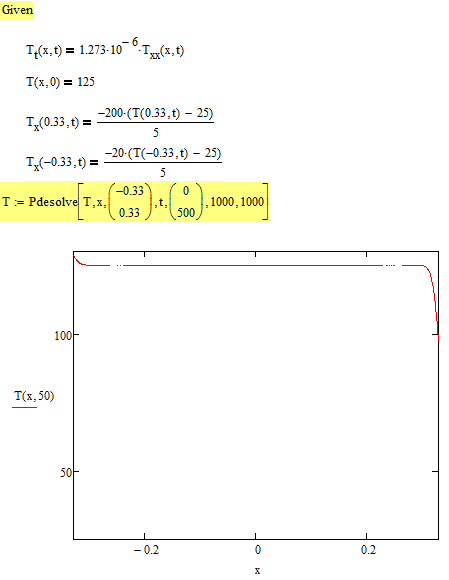
In any case you should see something like this:

Problem_2.png

2 replies

25-Diamond I
November 12, 2013

OK, a lot of errors, so lets begin:

1) Your functions and derivatives in the solve block are missing the arguments (T.x --> T.x(x,t))

2) In the last two BC you have a multiplication dot between the function name (T.x) and the parameter parenthesis

3) the call of Pdesolve is completely wrong. Look it up in the help! The boundaries have to be given as a 2-element vector, separated (as every other parameter, too) from the variable name by a comma.

4) The result of Pdesolve is a function in two parameters itself. You must assign it a simple function name only (without the parameters)

You may be interested in this thread, too: http://communities.ptc.com/message/210873#210873

1-Visitor
November 12, 2013

Werner,

Thank you for all the feedback! I assume that your screen shows the solution? In my case, I have the Pdesolve in red and an error saying that this value must be an integer. Is there anyway I can correct this issue? I already looked at the thread, and the thread has the same error as the file you attached...and its aggravating that none of the help files in the mathcad worksheet load as most of them seem to have the same error too...

Werner_E25-Diamond IAnswer
25-Diamond I
November 12, 2013

Thats strange, I get the same error if I open my attachment but not if I open if from my HD. The problem is easily corrected by simply letting the sheet recalculate (Ctrl-F9).

For whatever its worth I resaved the file and attach it here,

In any case you should see something like this:

Problem_2.png

24-Ruby IV
November 19, 2013

I do not know need we the pdesolve function in Prime. With units. What do you think about it?

1-Visitor
November 20, 2013

Yeah, but I do not know how to do that...do you?