14-Alexandrite
September 27, 2023
Solved

Pasted a Material Table from Excel, Lookup values

  • September 27, 2023
  • 1 reply
  • 2567 views

Hello,

i don't want to read excel file to get the material properties for a given section. As you can see in the attached file, i copied the material section properties and pasted it into mathcad prime. Is there a way the user can select the material as i am showing below the table TC= " A22B", and have it look up certain section properties. I was able to do it in MathCAD 15.


Thanks,

Sam
 

Best answer by terryhendicott

Hi Sam

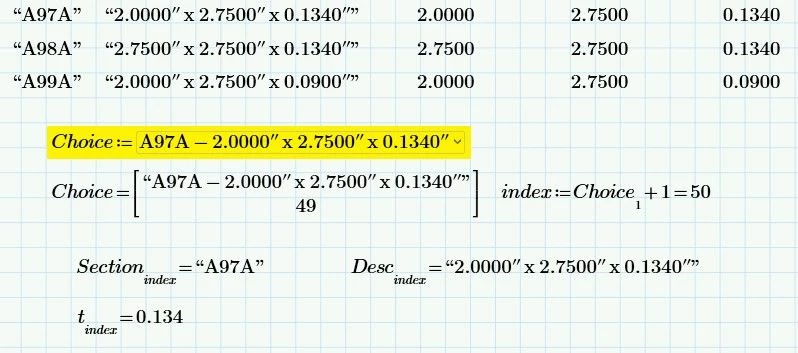
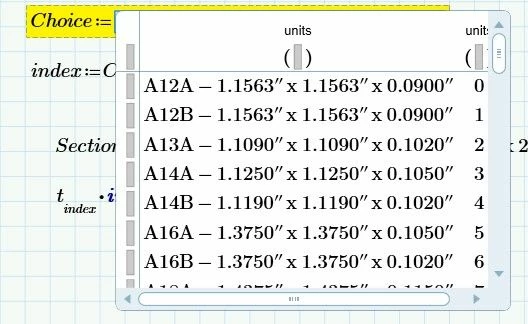
Q1>  Improved Combo Box with both  code and size in second column.

Note it starts in the second column because you can cut and paste to this but not the first column. Go figure.

The third column is the returned index.

The combo box only shows the second column when working for selection.

Q2>  However what it returns is a vector of two elements.

We simply want the second element

Capture.JPG

Capture2.JPG

Q3>  "t" is working now.  File enclosed.

1 reply

21-Topaz II
September 27, 2023

Hi Sam,

1>  Move the input table down a bit to show headings of columns.

2>  Add the headings

3> You could add units at top of columns but at the moment the text in first row prevents this.

means each column is a vector with text in first row so you cannot add units to text.  Once you have all the heading titles in the top of the sheet recommend deleting top row and adding units.

Capture.JPG

4>  Created a combo box that allows you to select one and return an index.

5> Can select a column by its title and use index to get value.

6> Currently index is +1 for text in first row.

Capture2.JPG

SFares14-AlexandriteAuthor
14-Alexandrite
September 27, 2023

Thank you so much, Terry!

Few questions:

1. Is there an easy way to create the combo box of sizes? Did you have to manually input all of them?

2. In the equation for index, what is the subscript (1) for in Choice? Does it provide the row number?

3. Headings below say " this value must be a scalar or a matrix".  You got a value for "t", but when i opened the file you attached, it says " this variable is undefined... 

Thanks!

SFares_0-1695831483270.png


21-Topaz II
September 27, 2023

Hi Sam

Q1>  Improved Combo Box with both  code and size in second column.

Note it starts in the second column because you can cut and paste to this but not the first column. Go figure.

The third column is the returned index.

The combo box only shows the second column when working for selection.

Q2>  However what it returns is a vector of two elements.

We simply want the second element

Capture.JPG

Capture2.JPG

Q3>  "t" is working now.  File enclosed.