7-Bedrock
May 25, 2023
Solved

Plot two transfer function in one plot

  • May 25, 2023
  • 3 replies
  • 3102 views

Hi,

I am having few issue with plotting transfer function:

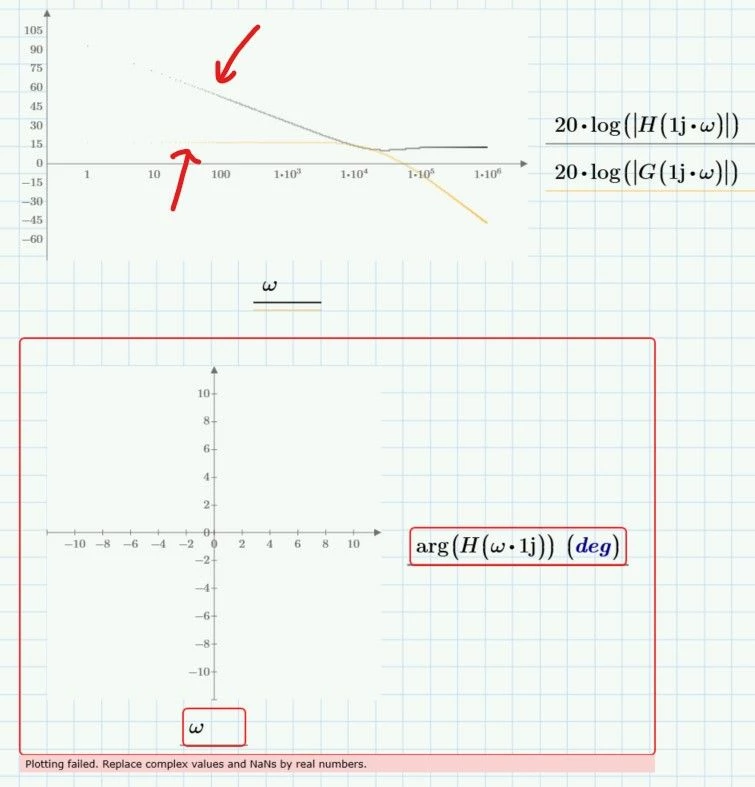
  1. Bode plot
    1. How to make line more obvious in the low frequency area?
    2. How to get ride of #4 zone of the plot, it doesn't have any
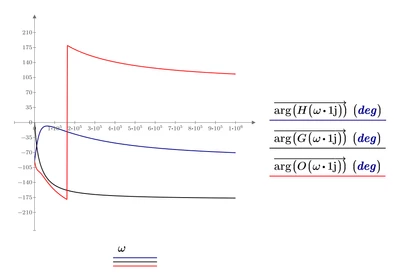
  2. I cannot plot phase plot, and i don't know why, please.
2023-05-24 220326.jpg

Attached is what i have done.

Best answer by Werner_E

You forgot to vectorize the function calls at the y-axis!!

Werner_E_0-1685038265006.png

Werner_E_1-1685038274654.png


3 replies

23-Emerald I
May 25, 2023

The "error message" under the phase plot provides a potential clue!  Try " Re(H(w*1j)) "

25-Diamond I
May 25, 2023

omega is a range, not a vector and so you get into troubles when you use omega as argument in your function H.

H(omega*1j)= will display what looks like a vector (but isn't) and trying to assign it a variable like X:=H(omega*1j) would throw an error.

One way to deal with the problem would be to turn omega into a vector.

But I was surprised to see that just applying vectorization does the job as well:

Werner_E_0-1685019524274.png

Vectorization (the arrow over the expression) can be applied via its keyboard short or via the menu

Werner_E_1-1685019771217.png


EDIT: Actually it is a strange error as IMHO it SHOULD work the way you had tried to do.

EDIT2: Actually it indeed does work the way you had set it up.  As I noticed later (see my answer below) simply recalculating the sheet makes the error vanish.

Mirui7-BedrockAuthor
7-Bedrock
May 25, 2023

This morning i copied a phase plot from other documents and it starts to work! this is wield!

25-Diamond I
May 25, 2023

Strange, yes.

I just gave it a try, opened your original sheet (which shows the error) in Prime 9 and simply, without changing anything, let it recalculate - the plot showed up without any error.


But using log spaced values for omega and vectorization as shown is the better approach anyway.

25-Diamond I
May 25, 2023

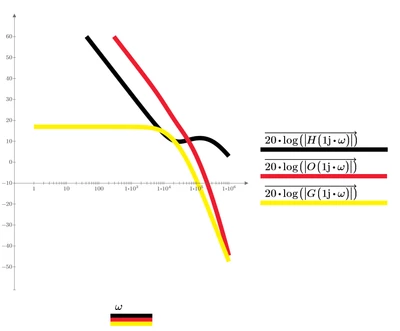
According the visibility of the traces in your first plot:

Prime only plots tiny points without connecting them if the trace consists of 50000 or more points which is the case in your plot. The settings for Symbol, Line Style and Trace Thickness are ignored, only the color can be changed. Using your range variable each trace consists of 200001 points.

One way to deal with is to decrease the number of points to be plotted by using a larger step in the range

Werner_E_3-1685025912850.png


But as you have a logarithmically scaled abscissa, it would be a better idea to evenly space the omega values at the log x-axis. This can't be done using a range variable, but this is exactly what the functions "logpts()" and "logspace()" are made for.
As they create a vector and not a range, you should use vectorization when you use omega as function argument.

Here just 1000 points are used for plotting each trace:

Werner_E_4-1685026482806.png

Using a vector for omega and using vectorization when you use it also cures the problem with the "arg" function.


Prime 9 file attached


Mirui7-BedrockAuthor
7-Bedrock
May 25, 2023

Thanks, the 1,22,...10^6 trick worked! But last method didn't, on my side it didn't give me any error, but there is no line anymore in graph area.

25-Diamond I
May 25, 2023

You will have to post the sheet so we could see what did not work and why.

Did you experience that "empty" plot right after opening my sheet?


Using logspace definitely is the better approach as (even though it works) its not a good idea to set up about half a million points for each trace to compute.