8-Gravel
April 16, 2024
Solved

Plotting a function with multiple solutions in one trace

  • April 16, 2024
  • 1 reply
  • 1388 views

Mathcad Prime 9


Hello,


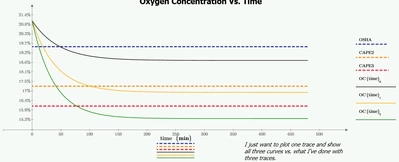
I am trying to plot a function which has a matrix as one of its variables.  I want to plot the function as one trace so that when the matrix grows or shirks with length, I don't have to add or subtract plot traces.


I made a simple example of oxygen displacement in a room with a range of different asphyxiant gas (3x1 matrix) for a given room and ventilation rate.


I could display the result of all three curves by adding three traces and use the matrix index...but I want to avoid this manual step and automatic plot all the curves, let's say... when I modify the asphyxiant gas rate to be a 6x1 matrix or a 2x1 matrix. I think I've seen this done before, but don't recall where.

 

CD_9999850_1-1713279432621.png

CD_9999850_0-1713279408259.png


Thanks,


Regards, 


Colin

Best answer by Werner_E

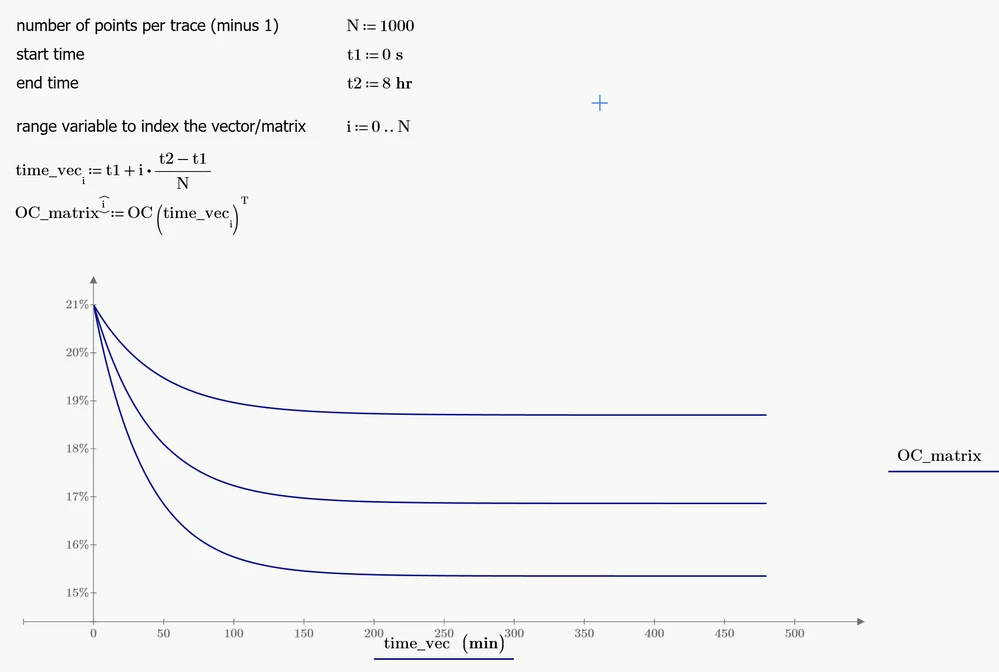
Here is one way to do it.

Its not a functional approach but rather plots a matrix over a time vector (waterfall plot)

Werner_E_0-1713282533482.png


Prime 9 file atached

1 reply

Werner_E25-Diamond IAnswer
25-Diamond I
April 16, 2024

Here is one way to do it.

Its not a functional approach but rather plots a matrix over a time vector (waterfall plot)

Werner_E_0-1713282533482.png


Prime 9 file atached

8-Gravel
April 16, 2024

Ah this jogged my memory; I do recall the use of the transpose "T".


This solution worked as I requested....it worked for the example and for the actual engineering evaluation I'm working on today.


Thanks for the very quick, almost real time response Werner_E!  Come to think of it you helped with the first question I ever posted... I think sometime last year, you are an asset to the Mathcad community. 


-Colin

ttokoro
21-Topaz I
21-Topaz I
April 18, 2024

image.pngimage.png

image.pngimage.png

t.t.