12-Amethyst
February 12, 2018
Solved

Plotting boxes in 3D

  • February 12, 2018
  • 2 replies
  • 5847 views

Hi everyone!

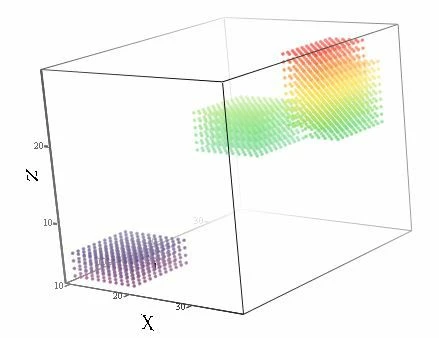
I am trying to find a better solution (working for many more "boxes") for the problem exemplified in the attachment. I have a list of "boxes", defined in a matrix of X,Y,Z coordinates.  I would like to get a 3D representation of the boxes. What I have attached works, of course, but it would be much better if one could represent the "walls" of the boxes, without all the points inside.  Is this too much for MathCAD?  what do you think?

Thanks a lot for any hints!

Regards

Claudio
box.JPG

Best answer by Werner_E

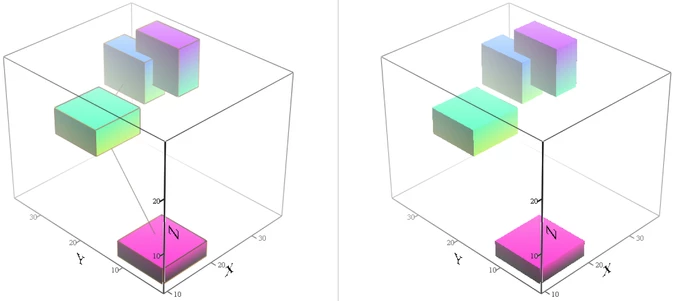
Here is my second attempt. This time all boxes represent just one single plot, but the boxes are now connected by a line which is of course disturbing. Only way to get rid of this is to do without potting the wireframe lines.

Bild.png

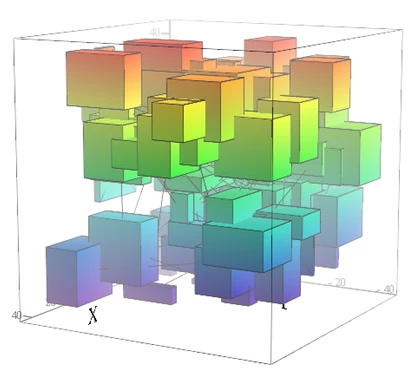
But at least you won't run into some kind of limitations and don't have to go through the hassle of having to format the style of every box at its own. See here a sample plot with 100 random boxes:

Bild2.png

2 replies

25-Diamond I
February 12, 2018

I guess you would have to dig into

https://community.ptc.com/t5/PTC-Mathcad-Questions/Creating-Amazing-Images-with-Mathcad-14/td-p/441375

Still the bible when it comes to plotting in Mathcad


12-Amethyst
February 12, 2018

Hey Werner, thanks!  I wasn't aware of this. The E-book is really the exe-file attached to the post? it is somehow an unusual format ... 

Regards 

Claudio

25-Diamond I
February 12, 2018

You might also be interested in the article of uni (Viacheslav N. Mezentsev ) - see the last post in this thread:

https://community.ptc.com/t5/PTC-Mathcad-Questions/Ploting-finite-triangle-and-rectangle-in-3D-plot/td-p/327681

Its in russian but the pictures of the first few pages should give you a hint how to create a box.


25-Diamond I
February 12, 2018

Here is my first attempt using some data structure from the "amazing images".

Unfortunately it creates a separate plot for each box which may make you run into some limitation if you'd like to plot a lot of boxes (apart from having to set the appearance for each box in an extra step.

In the E-book there are routines which can make it just one single plot (if you have the time to dig into and experiment).

Bild.PNG

 
Werner_E25-Diamond IAnswer
25-Diamond I
February 12, 2018

Here is my second attempt. This time all boxes represent just one single plot, but the boxes are now connected by a line which is of course disturbing. Only way to get rid of this is to do without potting the wireframe lines.

Bild.png

But at least you won't run into some kind of limitations and don't have to go through the hassle of having to format the style of every box at its own. See here a sample plot with 100 random boxes:

Bild2.png

12-Amethyst
February 13, 2018

I wish to thank you very much, Werner, both for making me aware of the "Amazing Images" E-Book (it works! 🙂 and for even programming the requested solution for me!  I certainly had required more time! I was still wondering at the book ... 

Regards and thanks a lot again

Claudio