1-Visitor
October 19, 2017
Solved

Plotting error help: "this value must be a real number"

  • October 19, 2017
  • 3 replies
  • 4395 views

Can anyone help me figure out what I'm doing wrong? I can't seem to get a plot that shows, Eavg on the y-axis and Eavg(C1) on the x-axis...
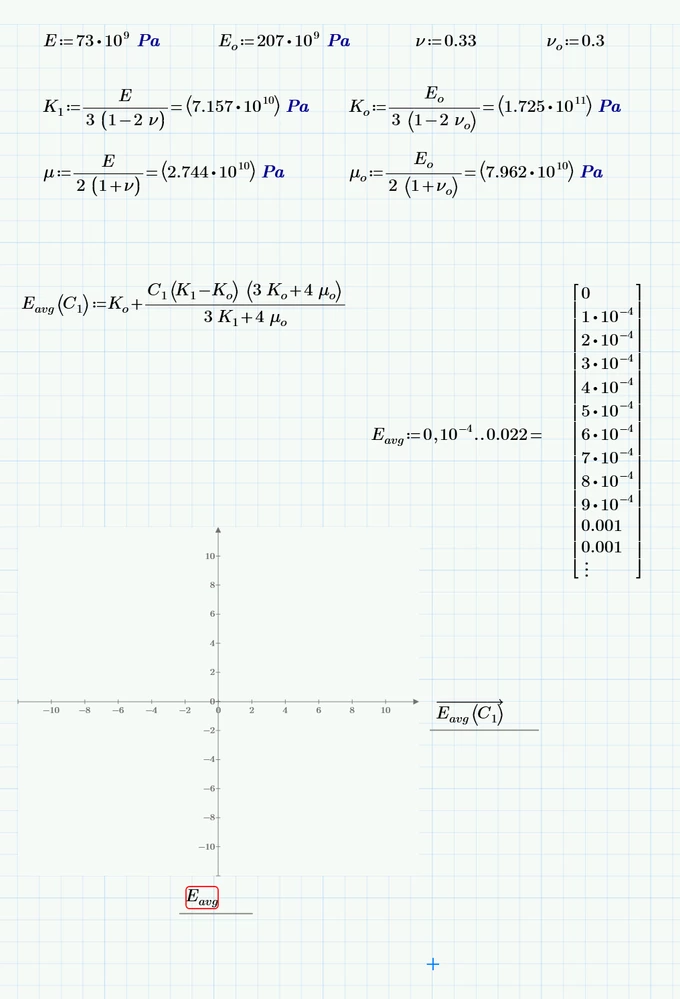

Capture.PNG

Best answer by terryhendicott

Hi,


Your graph is only plotting two points 0 and 1.  Prime draws the straight line between these two points.

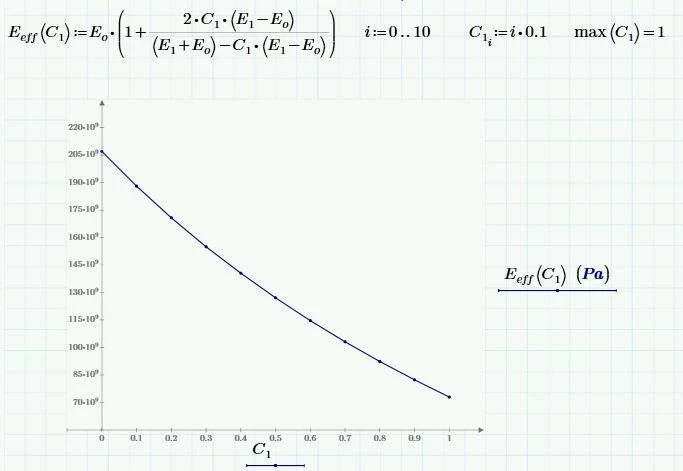
I have corrected it so it plots 11 points 0,0.1..10.  I have formatted the plot to show these points.  It is now not a straight line but a smoothed line through these points.

Capture.JPG

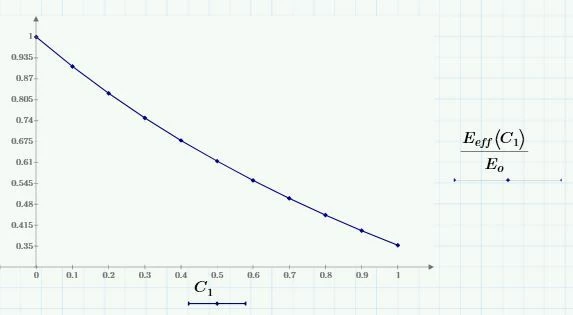
Eo is a constant so it is easy to plot its graph against C1

Capture2.JPG


3 replies

24-Ruby IV
October 19, 2017

Try please

E(C):=...

C:=1*unit, 1.001*unit..10*unit

and plot the graph  E(C) as function C


Or send please the sheet!

21-Topaz II
October 19, 2017
ecihan1-VisitorAuthor
1-Visitor
October 20, 2017

Thanks! I've modifed the formula a bit and the plot of Eeff seems to be correct as the volume fraction, C1 increases to 1.  Another question, would it be possible to plot the line of Eeff/Eo as a function of C1?  If so, how would I go about doing it?  I've been trying but no avial...


Edit: is this way of plotting C1 only plotting two points, 0 and 1? or are there numerous points being plotted inbetween 0 to 1?


Capture.PNG

21-Topaz II
October 20, 2017

Hi,


Your graph is only plotting two points 0 and 1.  Prime draws the straight line between these two points.

I have corrected it so it plots 11 points 0,0.1..10.  I have formatted the plot to show these points.  It is now not a straight line but a smoothed line through these points.

Capture.JPG

Eo is a constant so it is easy to plot its graph against C1

Capture2.JPG


19-Tanzanite
October 19, 2017

Eavg is not a variable, it's a function name. Specifically, it's a function that depends on C1, so you need to plot Eavg(C1) against C1 (as Terry shows).