1-Visitor
July 28, 2025
Solved

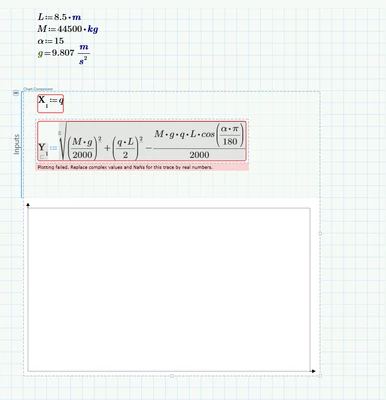
Plotting failed. Replace complex values and NaNa by real number.

  • July 28, 2025
  • 2 replies
  • 526 views

Hi, i have used too many hours trying to get the plot work but without success. Plot worked in mathcad 15 with normal plotting tool but need to convert calculation to prime 11.

thx

Screenshot 2025-07-28 135147.png

Best answer by Werner_E

You define X1:=q but q is not defined.

The native plots in Mathcad and also in Prime have a feature called "Quickplot" which means that you don't have to define the variable you use for the abscissa ("x-axis") and Mathcad would  automatically assign values for plotting (by default from -10 to 10 and you can change that by editing the axis limits.

But this only works in the native pots and not for the Chart Component.

And in Prime this only works OK for the native plot if you use unitless abcsissa values!

So no matter if you use the native plot or the Chart component, in Prime you have to define the values q for the absicissa by providing a range variable using correct units (in your case N/m = kg/s-2. For example
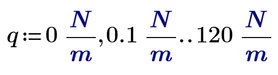
Werner_E_0-1753721770625.png

If you do this, both the native plot as well as the Chart component will work OK. Keep in mind that the chart component does not show or support units, it just uses the naked values.

Here the native plot:
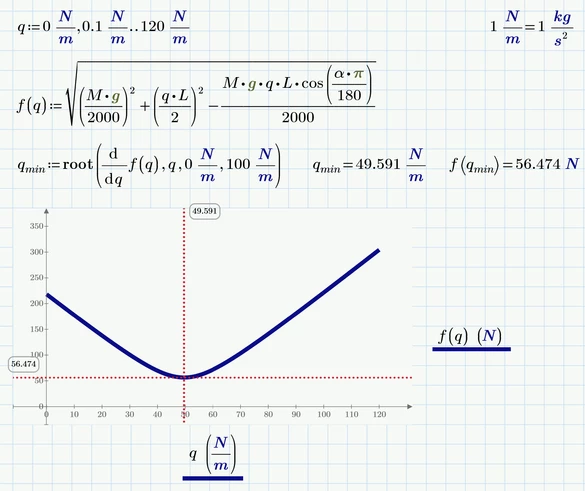
Werner_E_2-1753722253942.png


BTW, you may consider using unit "deg" when you define alpha (so you don't need the factor pi/180 when using it)


Prime 11 sheet attached

2 replies

ttokoro
21-Topaz I
21-Topaz I
July 28, 2025

Need q with unit kg/s^2.

image.pngimage.png

t.t.
1-Visitor
July 28, 2025

Thx for quick response, but i dont get it to work. Could you send me your file and use chart component, because i need grid behind the plot

Werner_E25-Diamond IAnswer
25-Diamond I
July 28, 2025

You define X1:=q but q is not defined.

The native plots in Mathcad and also in Prime have a feature called "Quickplot" which means that you don't have to define the variable you use for the abscissa ("x-axis") and Mathcad would  automatically assign values for plotting (by default from -10 to 10 and you can change that by editing the axis limits.

But this only works in the native pots and not for the Chart Component.

And in Prime this only works OK for the native plot if you use unitless abcsissa values!

So no matter if you use the native plot or the Chart component, in Prime you have to define the values q for the absicissa by providing a range variable using correct units (in your case N/m = kg/s-2. For example

Werner_E_0-1753721770625.png

If you do this, both the native plot as well as the Chart component will work OK. Keep in mind that the chart component does not show or support units, it just uses the naked values.

Here the native plot:

Werner_E_2-1753722253942.png


BTW, you may consider using unit "deg" when you define alpha (so you don't need the factor pi/180 when using it)


Prime 11 sheet attached