Why don't you attach your worksheet?
EDIT: I just saw that you made up for it later.
And why do you think that there is something wrong?
If the plot does not look like what you expect, you have to format it accordingly. And if you don't succeed doing so, you have to clearly state WHAT exactly you want it to look like.
I guess that you are confused because of Primes autoscaling. When using a so called quick plot (the variable x used at the abscissa must not be defined), Prime choses the values for the x-axis to run from -10 to +10. So the y-values are rather large and Prime has to scale the y-axis accordingly (look at the scale values in your plot) and this results in a heavily vertically squeezed plot.
There are two ways you can control this.
The first is to edit the values at each axis. You can edit the first, second and the last value at each axis (highlighted in yellow in the picture below). This is not a particularly intelligent solution, because hitting the right spots here can be very challenging, but once you do it works.
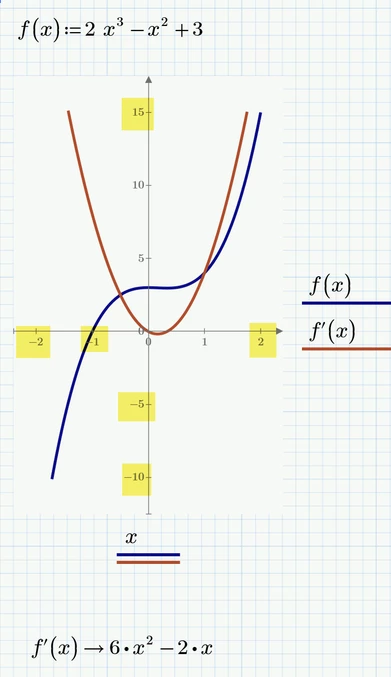
As you can also see in the picture it is not necessary to define the expression for the derivative. Prime will use a numerical algorithm to make up the plot. At the bottom of the picture you can see that you can also use the symbolic evaluation to show you the exact expression for the derivative.
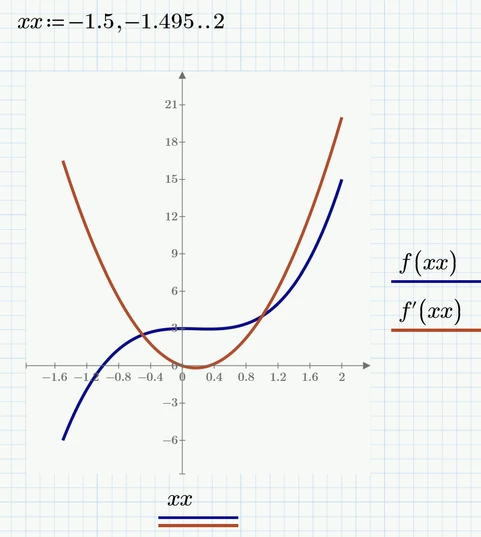
A second way to take over control of a plot is to define a range variable for the abscissa values. In the following picture I just used the name "xx" to use something different as in the picture before. Of course you can also use simply "x" as the name of the range. Note that Prime still will automatically adopt the necessary range for the y-values and the autoscale it selects is not always very clever, But you still can manually edit the values as explained before.
Prime 5 sheet attached


