

1-Visitor
March 29, 2020
Solved

PLS HELP! Error with the arrays at system of equations dealing with matrix.

  • March 29, 2020
  • 2 replies
  • 5518 views

Hello everyone!

I´m trying to solve a system of equations with vectors and the solver tell me that there is an error in the array... I put captures so you can see what im doing.

Thanks to everyone!

Best answer by Werner_E

I am surprised that you got a solution because when I tried I got the error message that no solution was found. Maybe I inadvertently changed an equation when I edited the file.


Anyway, the result you get in your variable solucion is a nested vector. A vector with six elements, each of which is a 12x1 matrix, a 12 element vector. By default Prime does not expand them when displaying but you can change that in the ribbon menu for array and tables.

You can also access a single result vector using vector indices.

So solucion[2= should show you the vector T.ico.


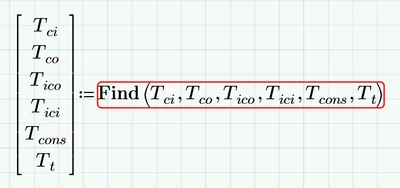
A better way probably is not to assign the result of the reply of the solve block to a single variable "Solucion" but to a vector of variables, like that:
Werner_E_0-1585568144419.png

In my first reply I forgot to mention why you should get rid of the square brackets. When you manually type a square bracket, you create a vector or matrix (like when you type Ctrl-M) which is sure not what you intended.


2 replies

23-Emerald IV
March 29, 2020

Yes, pictures are fine. But the worksheet is of much more help.

You should ALWAYS attach the (or a) worksheet that, at least minimally, shows your problem.


Success!

Luc

1-Visitor
March 29, 2020

Here is the file, wish it is clear

Is at the end of the file

23-Emerald IV
March 29, 2020

In the Guess values part you've nicely placed guess values for each of your variables to be solved.

No look at the labels of your guess values, and the labels of the parameters of the Find function. The guess values are labelled 'variable', while the parameters of the Find function are 'automatic'. Change those to 'variable' and see what happens.


Success!
Luc


25-Diamond I
March 30, 2020

Get rid of all the square brackets you typed manually! Especially the ones in your first equation which is the reason for the error message about the wrong array dimension.

Furthermore you should change your guess values to avoid the division by zero when using them (third equation).


Generally a much better approach would be to set up the solve block using just single scalar values, turn the solve block in a function with T.0 and T.red as arguments and then call this function vectorized.


1-Visitor
March 30, 2020

Hello Werner, i did that and now there is no error but i cant see the solution for each variable, how can i see them?

Werner_E25-Diamond IAnswer
25-Diamond I
March 30, 2020

I am surprised that you got a solution because when I tried I got the error message that no solution was found. Maybe I inadvertently changed an equation when I edited the file.


Anyway, the result you get in your variable solucion is a nested vector. A vector with six elements, each of which is a 12x1 matrix, a 12 element vector. By default Prime does not expand them when displaying but you can change that in the ribbon menu for array and tables.

You can also access a single result vector using vector indices.

So solucion[2= should show you the vector T.ico.


A better way probably is not to assign the result of the reply of the solve block to a single variable "Solucion" but to a vector of variables, like that:

Werner_E_0-1585568144419.png

In my first reply I forgot to mention why you should get rid of the square brackets. When you manually type a square bracket, you create a vector or matrix (like when you type Ctrl-M) which is sure not what you intended.