7-Bedrock
June 14, 2022
Solved

Polar plot axial gridlines

  • June 14, 2022
  • 3 replies
  • 1829 views

How to have angular and radial gridlines in polar plot? Can someone please share an example of how to do it prime 

Best answer by Werner_E

The native Prime plots don't offer grid lines and the badly implemented third party chart component does not allow polar plots, as far as I am aware (I may be wrong because I don't use it).

So you are on your own and if you want grid lines, you have to create them yourself.

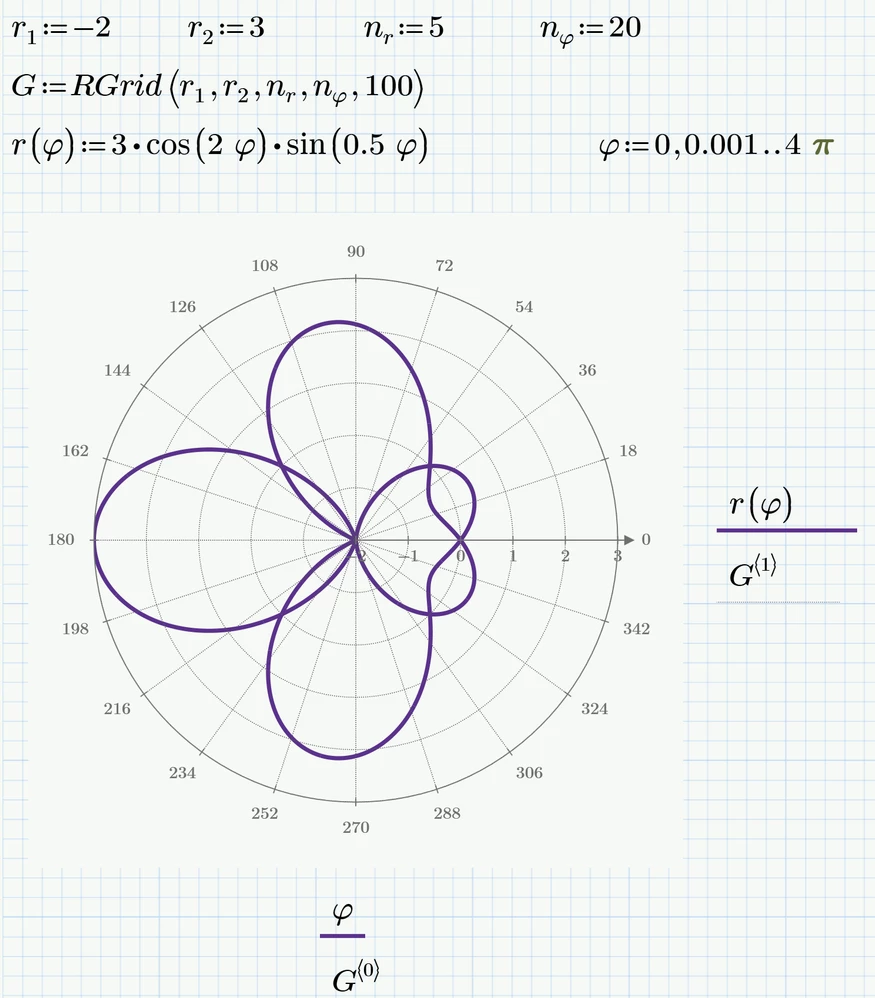
Attached is a little program which does exactly that. The grid is a second trace an can be formatted as needed.
Werner_E_0-1655218818952.png

Remark: For normal polar plots you would chose r1=0 of course.

It makes sense to adapt the numbers on the axis of the polar plot to the values chosen for the grid (or vice versa). You can change the second angle in the plot (18 in the pic) and the first, second and last value of the radii (-2. -1 and 3 in the plot).
I use the worksheet variables which are defined above the call to RGrid in the plot, but unfortunately the second value for the radii which is r.1+(r.2-r.1)/n.r is automatically changed to fix scalar whenever I change the value of r.1. I would call it a bug.
You will see the effect if you change r.1 from -2 to 0 and then back to -2.




3 replies

Werner_E25-Diamond IAnswer
25-Diamond I
June 14, 2022

The native Prime plots don't offer grid lines and the badly implemented third party chart component does not allow polar plots, as far as I am aware (I may be wrong because I don't use it).

So you are on your own and if you want grid lines, you have to create them yourself.

Attached is a little program which does exactly that. The grid is a second trace an can be formatted as needed.

Werner_E_0-1655218818952.png

Remark: For normal polar plots you would chose r1=0 of course.

It makes sense to adapt the numbers on the axis of the polar plot to the values chosen for the grid (or vice versa). You can change the second angle in the plot (18 in the pic) and the first, second and last value of the radii (-2. -1 and 3 in the plot).
I use the worksheet variables which are defined above the call to RGrid in the plot, but unfortunately the second value for the radii which is r.1+(r.2-r.1)/n.r is automatically changed to fix scalar whenever I change the value of r.1. I would call it a bug.
You will see the effect if you change r.1 from -2 to 0 and then back to -2.



23-Emerald IV
June 14, 2022

Here's another implementation.

LucMeekes_0-1655222191368.png

Which also allows to create grids such as:

LucMeekes_1-1655222254185.png

Success!
Luc

24-Ruby IV
June 14, 2022

It would be nice to start with the ability to draw not one, but two axes.

Pol-2-Axeas.png