4-Participant
March 6, 2025
Solved

Prime 10 write csv file with 15 significant figures

  • March 6, 2025
  • 3 replies
  • 903 views

Using Prime 10, I am trying to write CSV files containing coefficients of polynomials. The written values are limited to 10 characters. How do I increase the number of significant figures in the CSV files?


This was easy in MathCAD v15


Thanks,

Best answer by Werner_E

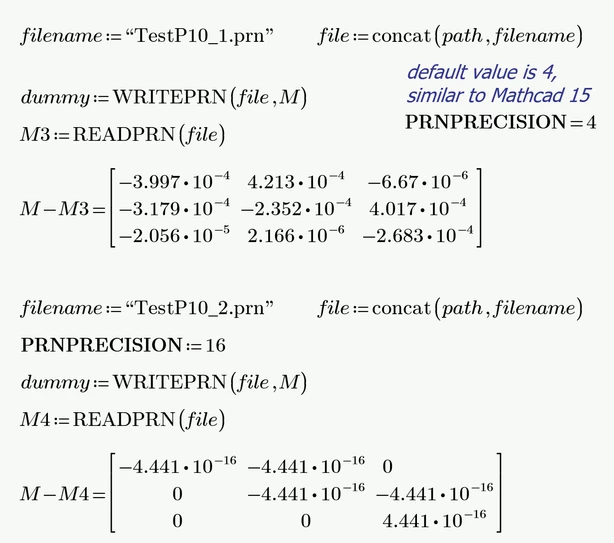
In case that you confused WRITECSV with WRITEPRN, her is an example for the use of the system variable PRNPRECISION

Werner_E_0-1741288053709.png


3 replies

21-Topaz II
March 6, 2025

Hi,

This value of a is written to csv file with 15 significant digits

Cheers

Terry


25-Diamond I
March 6, 2025

Can you provide an example?


I am using the current Prime 10.0.1.0 and can't confirm the problem.

It seems that Prime is writing the numbers with full IEEE precision.

Otherwise I would not know how to control the precision the numbers are output with.

Actually I am not aware of a switch in Mathcad 15 to control the output precision in WRITECSV.

I am aware of PRNPRECISION and also PRNCOLWIDTH but these system variables control the output of WRITEPRN and not that of WRITECSV and both system variables are also valid in Prime even though they are not accessible via the menu.


Here is my test file. As you can see is the file read in after writing is identical to the original within the usual IEEE tolerance. 15 significant digits are preserved.


Werner_E_0-1741286495476.png

Prime 10 sheet attached.

Region with "path" definition is disabled. Adjust the variable to your requirements and then enable the region.


Werner_E25-Diamond IAnswer
25-Diamond I
March 6, 2025

In case that you confused WRITECSV with WRITEPRN, her is an example for the use of the system variable PRNPRECISION

Werner_E_0-1741288053709.png


dbowman-24-ParticipantAuthor
4-Participant
March 6, 2025

Thank you all for the quick responses. I foolishly looked at the written results in Excel. When I followed Werner_E suggestion and read the CSV file back into MathCAD the correct 15 characters were there.Excel view of CSVExcel view of CSVMathCAD RoutineMathCAD Routine