1-Visitor
August 21, 2018
Solved

Prime 5.0 won't run after install

  • August 21, 2018
  • 7 replies
  • 5135 views

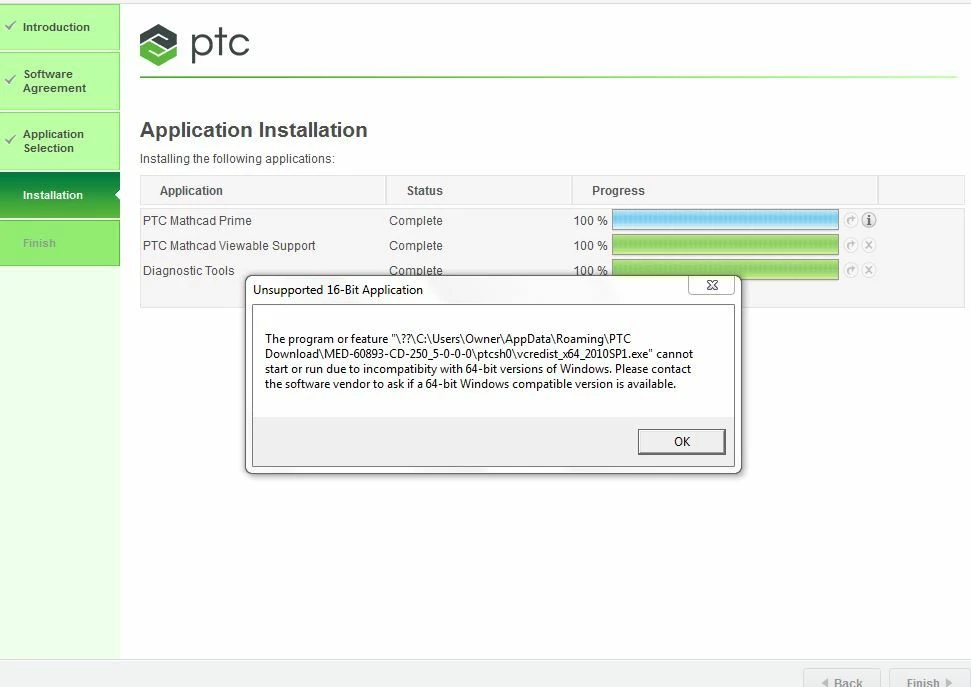
I just installed Mathcad prime 5.0 trial version on my windows 7 machine, and the install went okay, but right at the end I see this message:


PTC screen.JPGI tried un installing and re-installing, and got the same thing. My machine is an x64 machine... it is an older Dell.

When I run it, the splash screen comes up... then goes away. When I look in the task manager, it is running as a task, but It never opens the main screen. Any thoughts?

Best answer by Werner_E

@Bergytone wrote:

Hi Werner,

Thanks for the quick reply. When I look in the directory ...\PTC Download, it is empty. (maybe I can't see them with windows explorer-- because they are system files?? Anyway, should there be many (or any) files in this directory?

SHould I have run the install as an administrator?


I rather guess that this directory in ..Roaming.. is just a temp directory where the files are unpacked during installation of Prime and which is deleted after installation.

Guess the installation file you have is a self extracting archive with an exe-Extension, so if the file would be corrupt you should get an error message as of the corrupt archive.

So its more likely that the installation file you have is OK and if PTC would have packed a corrupt redistributable inside we would have heard more complaints I think.

So I have no idea what the cause for your problem may be. You may try to download the installation file again anyway or try to contact PTC support. There should be installation support even for non-paying Express users - maybe @VladimirN can provide the correct contact data.


EDIT: IN case you may give it try: You can download the redistributable which fails on your machine drectly from Microsoft

https://www.microsoft.com/en-us/download/details.aspx?id=13523

Its the same file I posted.

You may try installing it and maybe Prime will work then.

7 replies

25-Diamond I
August 22, 2018

Obviously Prime 5 relies on the older Microsoft Visual C++ 2010 Redistributables.

If your Win 7 is 64 bit the file vcredist_x64_2010SP1.exe mentioned should run and install the redistributables necessary for programs created with M$ Visual C++ 2010 on your machine.

The error message does not make much sense as the file vcredist_x64_2010SP1.exe obviously is for 64 bit OS. Not sure why your windows thinks its just a 16bit application.

What happens if you manually start vcredist_x64_2010SP1.exe?

Maybe the installation files are corrupt and you may try to download them again.

I attach the vcredist_x64_2010SP1.exe which was included in the Prime5 archive  I downloaded so you can compare it bitwise (maybe using "fc /b ....") with the version you have.


Bergytone1-VisitorAuthor
1-Visitor
August 22, 2018

Hi Werner,

Thanks for the quick reply. When I look in the directory ...\PTC Download, it is empty. (maybe I can't see them with windows explorer-- because they are system files?? Anyway, should there be many (or any) files in this directory?

SHould I have run the install as an administrator?

Werner_E25-Diamond IAnswer
25-Diamond I
August 22, 2018

@Bergytone wrote:

Hi Werner,

Thanks for the quick reply. When I look in the directory ...\PTC Download, it is empty. (maybe I can't see them with windows explorer-- because they are system files?? Anyway, should there be many (or any) files in this directory?

SHould I have run the install as an administrator?


I rather guess that this directory in ..Roaming.. is just a temp directory where the files are unpacked during installation of Prime and which is deleted after installation.

Guess the installation file you have is a self extracting archive with an exe-Extension, so if the file would be corrupt you should get an error message as of the corrupt archive.

So its more likely that the installation file you have is OK and if PTC would have packed a corrupt redistributable inside we would have heard more complaints I think.

So I have no idea what the cause for your problem may be. You may try to download the installation file again anyway or try to contact PTC support. There should be installation support even for non-paying Express users - maybe @VladimirN can provide the correct contact data.


EDIT: IN case you may give it try: You can download the redistributable which fails on your machine drectly from Microsoft

https://www.microsoft.com/en-us/download/details.aspx?id=13523

Its the same file I posted.

You may try installing it and maybe Prime will work then.

24-Ruby IV
August 22, 2018

1. Download and install updates for your OS from the Windows Update Center.

2. Download Mathcad Prime 5.0 installer using the following link: https://support.ptc.com/appserver/auth/it/esd/product.jsp?prodFamily=MCD

3. Open a new "Case" for PTC's technical support here: https://support.ptc.com/apps/case_logger_viewer/auth/ssl/log