1-Visitor
April 10, 2025
Solved

Prime 7 Use Find to solve a loop

  • April 10, 2025
  • 2 replies
  • 1194 views

Hi all, 


I need to solve a calculation using Mathcad prime 7 for my work, but i am newer of mathcad and not able to solve it by maself, even with the help of ChatGTP, it's not clear. 


So my problem is, I have an array of 3 values as Tp by witch i can get my L0 array, and the fuction that i wanna get solved is as below.

YC_13238834_0-1744275690739.png

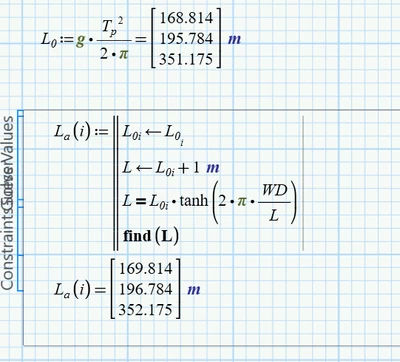
When there is only one Tp/L0, the problem is easy to be solved, you will find the solution is 311.733m for a Tp of 15s. However, when the TP or L0 is an array of multiple values, then i cant get it solved correctly in the solve block, either i cant get a solution or the solution is incorrect (ie. for a Tp of 15s, the solution is 352.175m comparing to 311.733m that i found at the other sheet).

Btw, in my full calculation sheet (as shown below as screenshot), i build the block in the same way, not sure why it works but not in the calculation table I built separately.
YC_13238834_1-1744277315745.png


Can someone can help me write it correctly ? thanks


Attachment: 

Find with only one vector.mcdx

and Find with an array.mcdx



Best answer by Werner_E

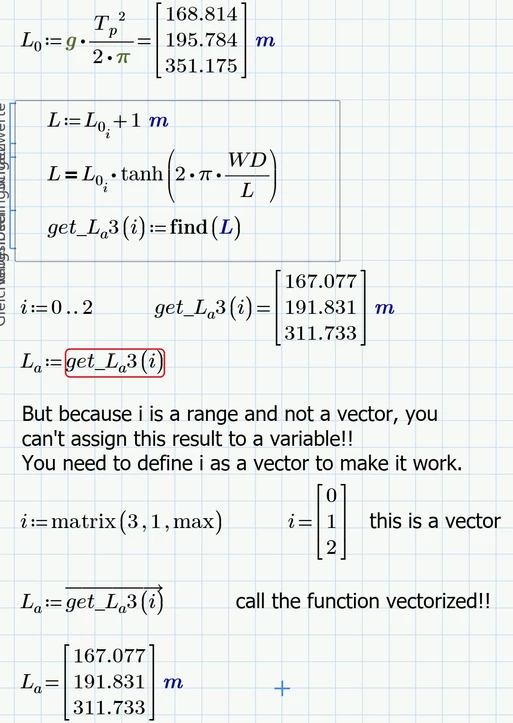
I guess you won't be able to assign this result "vector" (it just looks like a vector, but isn't) to a variable, right?

You would have to define "i" as a vector rather than a range to make it work.

Werner_E_0-1744296906303.png

See my reply to your initial question for, what I think, more compact and easier solutions.


2 replies

24-Ruby III
April 10, 2025

Hi,

because I am not expert ... this is all I can think of:

MartinHanak_0-1744281175237.png


1-Visitor
April 10, 2025

Problem solved !! ðŸ˜Š

YC_13238834_0-1744286740829.png


Martin, thank you anywyay !!


Werner_E25-Diamond IAnswer
25-Diamond I
April 10, 2025

I guess you won't be able to assign this result "vector" (it just looks like a vector, but isn't) to a variable, right?

You would have to define "i" as a vector rather than a range to make it work.

Werner_E_0-1744296906303.png

See my reply to your initial question for, what I think, more compact and easier solutions.


25-Diamond I
April 10, 2025

I would suggest that you turn L0 and the solve block into functions dependent on Tp and then call the solve block function vectorized(!!) with the vector Tp as its argument.

Werner_E_0-1744295801629.png

You may also use the "root" function instead of the solve block with find

Werner_E_1-1744296107341.png


Don't have Prime 7 installed so I can't attach a worksheet you can read (the attached one is in P10 format), but you shoiuld be able from the pics to duplicate what I did.


1-Visitor
April 10, 2025

Thank you for the "root" function, it's very helpful. ðŸ˜Š

25-Diamond I
April 10, 2025

The "root" function can be used in two ways:


Either by providing and interval, two values, one to the left and the other to the right of the expected solution like I did. I had chosen constant values 1m and 1000 m, but it may be better to use something like 1m and L0(Tp)+10m or similar.


Or you use "root" by providing a guess value.

Werner_E_0-1744300740975.png

Turned into a function and providing the same guesses which you used in your solve block it looks like this

Werner_E_1-1744300800377.png