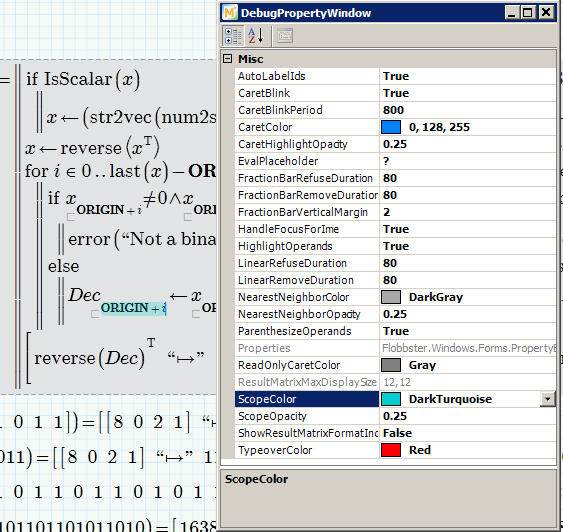
Prime - DebugPropertyWindow
I already had mentioned it a while ago but was not able to reproduce it - now I am 😉
has anybody already noticed the DebugPropertyWindow, where you can change some sort of things?
Most helpful as I now can change the color and opacity of selected parts of an expression, which are normally very hard to spot on some notebooks and LCD screens.
As far as I can tell, the changes are permanent and are global, not for the active worksheet only.
I stumbled upon the keyboard shortcut while trying (to no avail) to get the OR operator via keyboard on my German keyboard - most shortcuts don't work as expected or do not work at all on foreign keyboards.
The keyboard shortcut for OR should be Ctrl-Shift-@ (and now I know that on my keyboard I have to press Ctrl-Shift-2).
For the @ character I have to press AltGr-q which did not work, but that way i found, that
Shift-AltGr-q
or
Shift-Ctrl-Alt-q
brings up the aforementioned DebugPropertyWindow., at least it works that way on my keyboard.
It works that way in Prime 3.0 and in Prime 3.1.
I am not sure of most of the entries, but a few of them can be very useful,
CaretColor is the color of the cursor
ScopeColor is the color of selected (parts of a) region
I found it quite useful and maybe there are even more treasuries to find.
If you do, post 'em here.
Not sure if the keyboard short is the same an English-keyboards, too.
Regards, Werner